

AVAYA DOCUMENTATION CENTER
Find answers to your technical questions and learn how to use our products
Avaya Device Adapter Snap-in Reference
Digital 2616 phone
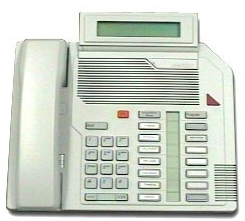
The preceding picture is of an M2616 digital phone with the optional display. If the display is present, then the top key on the right-hand button column (key 7) must be for the Program key. The Program key allows to set the display options. The 2616 phone is not intended for the call center environment, but can still be used in the call center environment.
If the 2616 phone is used in a call center environment, the call center position ID button can be used for agent login and logout. The station has a normal handset, so the call center option of logging in by using a headset is not available.
It has 16 keys (buttons) that can be configured as any of the number of features.
For call center operations, the bottom button (key 0) is always assigned as the call center extension and position ID. The other fifteen buttons can have any feature desired. However, normally one is transfer and another is conference. Some of the remaining keys are assigned call center functions such as call supervisor.
If the 2616 phone is not used for call centers, key 0 is the station extension and no call center feature buttons are configured.
The LCD lamp beside the key shows nothing to indicate Off. A lit triangle pointing at the button indicates On. A flashing triangle is for different events such as ringing. The lamps are between the buttons, so half the triangles point left (the ones to the right of their buttons), while the other half point right.
The 2616 phone supports attaching one or more expansion modules to add the following:
-
22 additional buttons (one module)
-
44 additional buttons (two modules)