

AVAYA DOCUMENTATION CENTER
Find answers to your technical questions and learn how to use our products
Avaya Device Adapter Snap-in Reference
Digital 3901 phone
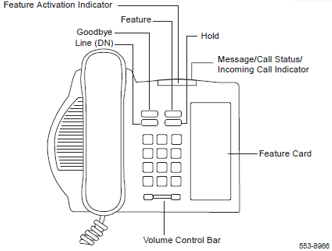
M3901 is a telephone with a single line key.
The M3901 phone operates in a different way than the other M3900 series digital phones. The M3901 phone supports five programmable features that are administered as keys: 1 through 5. Key 0 is the line key. The user activates the features by pressing the M3901 Feature Key, and then pressing the dial pad number key for that feature.
The system administrator programs the features for each M3901 phone. There is a feature card placed on the phone, which lists the features and instructions. The feature card is shown on the right-hand side of the phone in the preceding picture.
The M3901 phone has the following fixed keys:
-
The line button (station extension or call appearance)
-
Goodbye button
-
Hold button
-
Feature button (used as <feature + 1..5> to activate programmed feature
-
Volume control bar
It has a feature activation indication lamp to inform the user that the feature is active. It also has a lamp for call states or idle state and for message waiting indication.
Most CS 1000 services can be provisioned against the five features. For example, the administrator can program the station with autodial, conference, transfer, call forward, and access to a speed call list. Line appearances are not allowed.