

AVAYA DOCUMENTATION CENTER
Find answers to your technical questions and learn how to use our products
Avaya Device Adapter Snap-in Reference
Expansion Module for 11XX phones
On CS 1000, the expansion module (Graphical Expansion Module (GEM)), is supported on the following IP Phones:
-
IP Phone 1120E
-
IP Phone 1140E
-
A soft client edition exists for the IP Soft Client 2050
The expansion module is a hardware accessory that connects to an IP Phone to provide additional line and feature keys. The module is a graphical expansion module with 18 self-labeling keys.
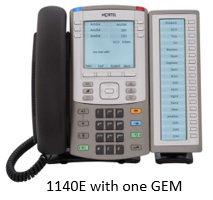
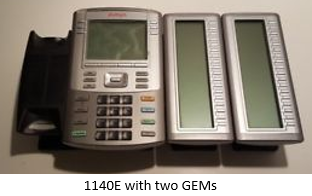
The supported IP Phone 1100 series phones can support a maximum of three expansion modules at one time. This allows the IP Phone 1120E and IP Phone 1140E to have a maximum of 54 additional line or feature keys.
The phones support a maximum of 54 added keys. The following are the options:
-
1-18 keys added:
-
Single 18-key GEM with nothing programmed against the shifted page.
-
-
19-36 keys added:
-
Single 18-key GEM with the Shift key and a shifted page.
-
Two 18-key GEMs. The Shift key will have no effect.
-
-
37-54 keys added: Three 18-key GEMs. The Shift key will have no effect.
Expansion Module: 18-Key GEM for 11xx Series Endpoints
-
Up to 18 additional keys:
-
Use one GEM.
-
CM endpoint configuration:
-
CS1000-Type=1120, 1140
-
Button Module Pages=1
-
Buttons-per-Page=18
-
Because the administrator defined only the first 1 to 18 buttons, Shift will not provide any added buttons. -
-
19 to 36 additional keys:
-
Using one GEM and Shift.
-
CM endpoint configuration:
-
CS1000-Type=1120, 1140
-
Button Module Pages=2
-
Buttons-per-Page=18CM requires the second module page for the shifted module entries. It is unaware that the second page is a shifted GEM page.Because this is a single GEM, the shifted key total is less than the maximum number of keys available.
-
-
-
Using two GEMs.
-
CM endpoint configuration:
-
CS1000-Type=1120, 1140
-
Button Module Pages=2
-
Buttons-per-Page=18
The Shift will not provide any added buttons. CS 1000 cannot use Shift on both GEMs because that exceeds the maximum button count for the station, and it cannot shift only one GEM. -
-
-
-
37 to 54 additional keys:
-
Use three GEMs.
-
CM endpoint configuration:
-
CS1000-Type=1120, 1140
-
Button Module Pages=3
-
Buttons-per-Page=18
The shift will not provide any added buttons. -
-
-
The following image shows the button module page. The screen shows 24 buttons. However, only 18 out of the 24 buttons are available, which are buttons 0 through 17. The rest of the buttons are unavailable.
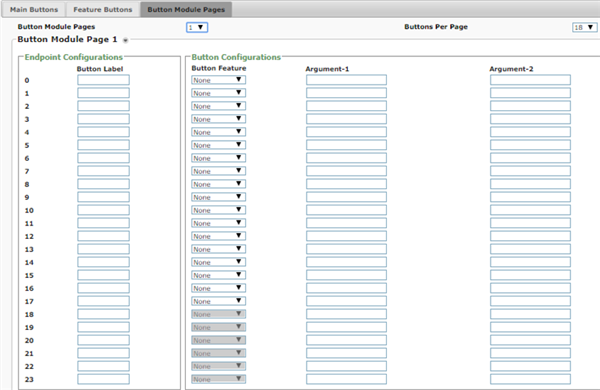
Note that each module screen is predefined with a size of 24 buttons, numbered 0 to 23 on the module. This represents the largest supported module size in Avaya Aura®. The buttons that are unavailable for use appear dimmed on the screen.
To navigate to the Button Module Pages tab, on System Manager, click , and then edit an endpoint. Click the Button Assignment tab.
Specify the data on the Button Module Pages tab:
-
Page use:
-
The first GEM always uses data from Button Module Page 1. If more buttons than the base 18 are needed, the second page can be used.
-
If two modules are used, the second GEM uses the data from Button Module Page 2.
-
If the station can use the Shift button and only one GEM is used, and when the GEM is shifted, the GEM uses the data from Button Module Page 2. Although only one physical GEM is configured, Communication Manager considers them as two separate modules.
-
-
Button Label: Any custom label name.
-
Button Feature: Select a compatible Communication Manager feature.
-
Argument-1 through Argument-3: Provide the additional data as specified in the Communication Manager feature documentation.