

AVAYA DOCUMENTATION CENTER
Find answers to your technical questions and learn how to use our products
Avaya Device Adapter Snap-in Reference
UNIStim 1165 phones
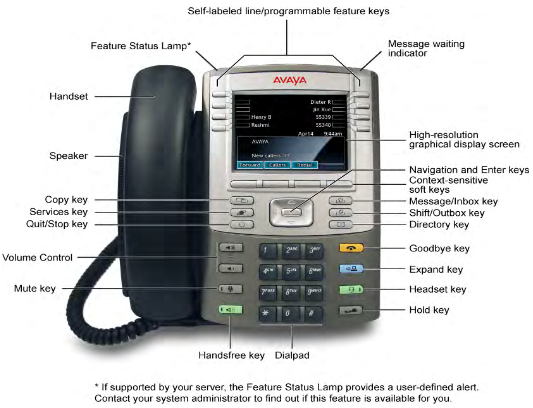
The 1165 station has eight programmable feature buttons with Shift, allowing sixteen to be programmed. It has the same intent as the IP 2007 phone to provide an improved display (color) and access. However, it maintains the physical buttons instead of relying on a touch-sensitive screen.
The 1165 phone has the following capabilities:
-
Sixteen programmable feature keys: Eight physical lines or feature keys, and eight lines or features accessed by pressing the Shift key.
-
Because it has effectively sixteen programmable keys, it is capable of multiple lines up to twelve.Note that the shifted set of programmable feature buttons appears on the feature keys list on Communication Manager and System Manager.
-
-
The station also allows the user to customize feature key labels, with limitations.
-
Four context-sensitive soft keys that provide access to a maximum of 10 features.
-
Large high-resolution graphical color display. Nine lines of 24 characters as the normal display:
-
The top four lines provide labels for the programmable buttons.
-
The next three lines show either idle display or call information.
-
The bottom line shows the current feature name for the soft key under the label.
-
-
Handsfree:
-
Speakerphone
-
Headset port and headset key
-
-
Volume keys instead of the volume bar. The volume keys perform the same function as the volume bar.
-
Hold, Release, Handsfree (Speaker), Headset, Mute, and Expand to PC keys.
-
Six specialized fixed keys:
-
Quit
-
Directory (Personal Directory)
-
Message (Inbox)
-
Shift or Outbox
-
Services
-
Copy. This not present on the 2004 phone.
-
-
Message Waiting Lamp and visual ring indicator.
-
Two Integrated Gigabit Ethernet Switch ports. Only one network port is required for phone and PC.
-
USB port for accessories such as wireless headset, mouse, or keyboard.
-
Wide-band audio if a third-party headset or handset that supports wide-band is connected.
-
Most fixed keys with an LED indicator integrate that into the button, rather than having it elsewhere on the station.
-
An Enter key at the center of the navigation rocker.
-
The feature status lamp. This has a narrow range of services for which it can be used and active.