

AVAYA DOCUMENTATION CENTER
Find answers to your technical questions and learn how to use our products
Avaya Device Adapter Snap-in Reference
Expansion Module for 12XX phones
Including setups with the BCM, the 1200 series has two Key Expansion Modules (KEM). One has 12 keys and the other has 18 keys. CS 1000 supports only the 12 key model.
The 12-key module provides soft labels that are based on the registered configuration.
On CS 1000, the expansion module is supported on the following IP Phones:
-
IP Phone 1220E
-
IP Phone 1230E
The 12 key KEM can provide 12 keys without Shift or 24 keys with Shift. It is soft labelled.
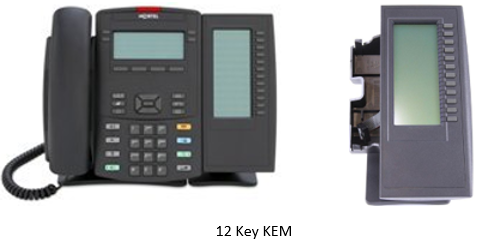
The supported 1200 series IP phones can support a maximum of three expansion modules at one time. This allows the IP phones to have a maximum of 36 additional line or feature keys with up to three expansion modules.
On Device Adapter, the phones support a maximum of 36 added keys. The following are the options:
-
12 Key KEM:
-
1-12 keys added: Single 12-key KEM, with nothing programmed against the shifted page.
-
13-24 keys added: Single 12-key KEM, with Shift.
-
13-24 keys added: Two 12-key KEMs, with nothing programmed against the shifted page.
-
25-36 keys added: Three 12-key KEMs, with nothing programmed against the shifted page.
-
CS 1000 supports up to four modules and 48 buttons, but Communication Manager allows only three pages of button module buttons.
-
Expansion Module: 12-Key KEM for 12xx Series Endpoints
-
Up to 12 additional keys:
-
Use one KEM.
-
The Shift will not provide any added buttons.
-
CM endpoint configuration:
-
CS1000-Type=1220, 1230
-
Button Module Pages=1
-
Buttons-per-Page=12
-
-
-
-
13 to 24 additional keys:
-
Using two KEMs
-
The Shift will not provide any added buttons.
-
CM endpoint configuration:
-
CS1000-Type=1220, 1230
-
Button Module Pages=2
-
Buttons-per-Page=12
-
-
-
Using one KEM and Shift
-
CM endpoint configuration:
-
CS1000-Type=1220, 1230
-
Button Module Pages=2
-
Buttons-per-Page=12
-
Communication Manager requires the second module page for the shifted module entries. It is unaware that the second page is a shifted KEM page.Because this is a single KEM, the shifted key total is the same as the maximum number of keys available. -
-
-
25 to 36 additional keys:
-
Use three KEMs
-
The Shift will not provide any added buttons.
-
CM endpoint configuration:
-
CS1000-Type=1220, 1230
-
Button Module Pages=3
-
Buttons-per-Page=12
-
-
-