

AVAYA DOCUMENTATION CENTER
Find answers to your technical questions and learn how to use our products
Implementing and Administering Avaya Aura® Media Server
Configuring log filter settings
Each log destination you configure on Avaya Aura® MS, whether SNMP, SysLog, or Archive, has filter settings which you can customize independently.
You can filter logs based on the severity and the class in which the logs are grouped, as described in the following tables.
|
Filter options by log class
|
|
|---|---|
|
Event type
|
Description
|
|
Audit
|
Audit events provide notification of very specific actions within a managed device. In isolation, an audit event provides limited data. However, a collection of audit information forms an audit trail.
|
|
Security
|
A security event happens in the interest of security. A security event occurs in the interest of security. A security event is often combined with other classes such as fault and audit to form a record or notification.
|
|
Configuration Change
|
A configuration event, also known as an inventory event, is used to notify the system that hardware, software, or a service has been added, changed, or removed.
|
|
Fault
|
The system generates a fault notification after a fault condition occurs. A fault notification can result in an alarm.
|
|
State
|
A state includes both administrative states that can be manually configured and operational states that are read-only and determined by the managed entity.
|
|
Data Dump
|
A data dump event is an asynchronous event that contains information about a system, such as the configuration and the state. The system generates these events as a result of a scheduled activity. Data dump events are not intended for a traditional poll-response type interaction.
|
|
Metrics
|
A metrics event contains a metric or a collection of metrics, including performance metrics, for an application, platform, or another device or network element. The record can be in a number of different formats, for example, XML, CSV.
|
|
Info
|
An event of interest which requires no action but can be used for troubleshooting purposes.
|
|
Maintenance
|
A maintenance event signals the beginning, process, or end of an action generated either by a manual or an automated maintenance action. Typically, the system reports the actual action initiation and the maintenance action.
|
|
Filter options by log severity
|
|
|---|---|
|
Event type
|
Description
|
|
Emergency
|
An unusable system.
|
|
Alert
|
An action must be taken immediately.
|
|
Critical
|
An immediate corrective action that is required due to loss of service, loss of bandwidth, outage, and loss of data or functionality.
|
|
Error
|
An error condition has occurred.
|
|
Major
|
An urgent corrective action that is required due to a pending loss of service, outage, and loss of data or functionality.
|
|
Minor
|
A corrective action is required to prevent an eventual degeneration of services.
|
|
Warning
|
A potential or impending service-affecting condition that is detected that requires some diagnostic action.
|
|
Notice
|
A normal but significant condition.
|
|
Indeterminate
|
A service-affecting condition that is detected whose impact is unknown.
|
|
Info
|
Audit-type information and configuration changes.
|
|
Debug
|
Diagnostic information.
|
Perform the following procedure to configure your log filters for each destination:
- Navigate to .
ADDITIONAL INFORMATION:
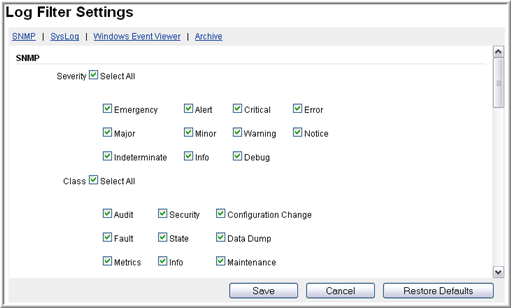
- Scroll down in the window to configure the filters for each destination: SNMP, SysLog, and Archive.
- Click Save.