AVAYA DOCUMENTATION CENTER
Find answers to your technical questions and learn how to use our products
Deploying Avaya Workspaces for Call Center Elite
Configuring a Hunt Group for Avaya Workspaces for Call Center Elite
Configure Hunt Groups for your Avaya Workspaces for Call Center Elite solution, so that calls can route to Avaya Workspaces for Call Center Elite agents. You can add multiple Hunt Groups for your Avaya Workspaces for Call Center Elite solution.
- Using an SSH client, connect to the Communication Manager System Access Terminal (SAT) interface.
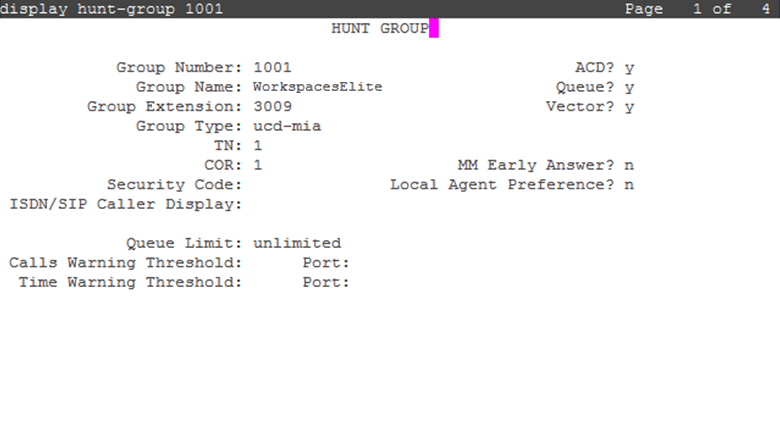
- On page 1 of the HUNT GROUP screen, perform the following steps:
- In the Group Number field, enter the number of the Hunt Group.
- In the Group Name field, enter the name of the Hunt Group. For example, use WorkspacesElite.
- In the Group Extension field, enter the extension number for this Hunt Group.
- Set the ACD field to y.
- Set the Queue field to y.
- Set the Vector field to y.
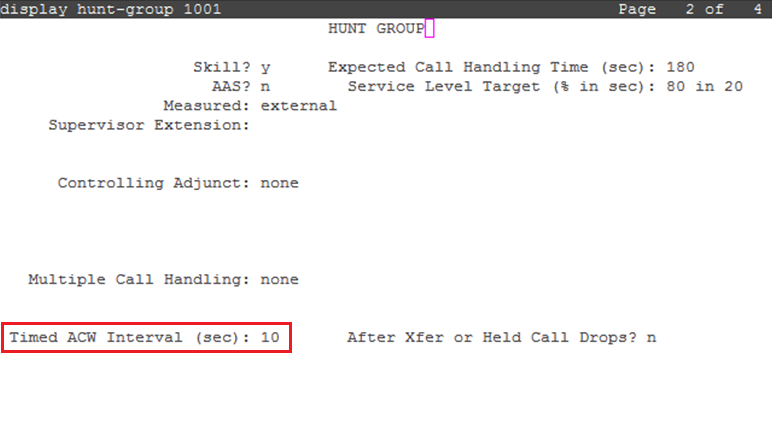
- On page 2 of the HUNT GROUP screen, perform the following steps:
- Set the Skill field to y.
- Set the Timed ACW Interval field to the required number of seconds for your solution. This sets the number of seconds Avaya Workspaces for Call Center Elite agents remain in After Contact Work after completing a VDN call.
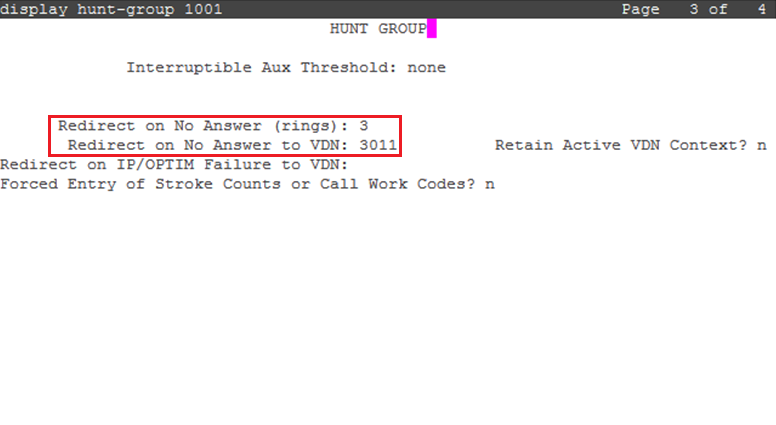
- On page 3 of the HUNT GROUP screen, perform the following steps:
- Set the Redirect on No Answer (rings) field to the required value for your solution.
ADDITIONAL INFORMATION:The value must specify the number of unanswered rings before the call is redirected.
- Set the Redirect on No Answer to VDN field to the required value for your solution.
ADDITIONAL INFORMATION:For this basic example, the call redirects to a VDN (3011). In this scenario, you can route the call to any configured VDN.
- Set the Redirect on No Answer (rings) field to the required value for your solution.
- Save the settings.