

AVAYA DOCUMENTATION CENTER
Find answers to your technical questions and learn how to use our products
Upgrading Avaya Session Border Controller
About upgrading and migrating Avaya SBC
General upgrade information
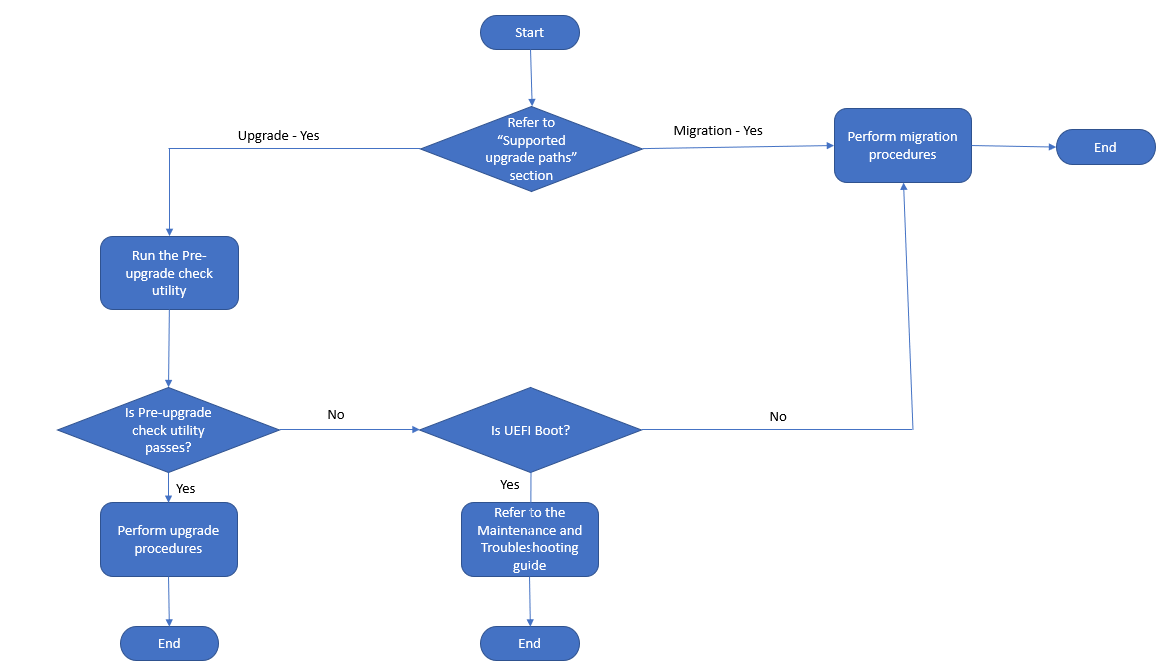
This section provides the upgrade and migration procedures for Avaya SBC.
Caution:
Doing an upgrade or migration on your system is service affecting. Plan upgrades or migrations for a maintenance period or when there is no traffic or during a low traffic period.
For the latest information about the standard upgrade process and migration process and the required patches to do an upgrade or a migration, see Avaya Session Border Controller Release Notes on the Avaya Support site at http://support.avaya.com.
Support for both web interface upgrades and command line migrations in the same deployment
The following scenarios describe how both upgrades and migrations can be used within the same deployment.
If the Primary EMS is corrupted (for example, partition requirements are not met), but the SBC (HA or single) is operational, you can first do a command line migration on the Primary EMS, and then do a web interface upgrade on the SBC.
If the Primary EMS is operational, but there are operational problems with the SBC (HA or single), you can first do a web interface upgrade on the Primary EMS, then do a command line migration on the SBC.
If one SBC in an HA pair is operational but the other SBC in the HA pair is corrupted, you can first do a web interface upgrade on the operational SBC, then do a command line migration on the other SBC.
In summary, you can use either the web interface upgrades or command line migrations within the same deployment depending on the condition of each EMS and SBC component.
Important:
When upgrading or migrating a deployment to a new release, you may see Data Replication is broken
alarms. For more information about this alarm and how to fix it, see Maintaining and Troubleshooting Avaya Session Border Controller.
Support for both web interface rollbacks and command line rollbacks in the same deployment
Similar to the using both upgrades and migrations in the same deployment, you can use web interface rollbacks and command line rollbacks in the same deployment. See the following example scenarios.
If the web interface rollback on the SBCs worked properly, but there was some problem rolling back the EMS using the web interface, you can use the command line rollback procedures.
If there is a problem rolling back one or more SBCs using the web interface, then you can use the command line rollback procedures as required. You can still roll back the other SBCs and the EMS using the web interface procedure.