DOCSHUB DOCSHUB
  • Library
  • Avaya Support Site Avaya Learning Blogs Videos & Podcasts Knowledge base Report Product bugs
Deutsch English Español (México) Français Français (Canada) Italiano Magyar Nederlands Polski Português (Brasil) Română Русский עברית العربية 中文(简体) 中文(繁體) 日本語 한국어
Login
DOCSHUB DOCSHUB
  • Library
  • Avaya Support Site Avaya Learning Blogs Videos & Podcasts Knowledge base Report Product bugs
  • Deutsch English Español (México) Français Français (Canada) Italiano Magyar Nederlands Polski Português (Brasil) Română Русский עברית العربية 中文(简体) 中文(繁體) 日本語 한국어
Login

Avaya Aura® Application Enablement Services TSAPI and CVLAN Client and SDK Installation Guide

Table of Contents

Type to filter navigation items by title
  • Legal
  • Introduction
    • Purpose
    • TSAPI and CVLAN backward compatibility
  • Installation Prerequisites
    • Download location for clients and SDKs
    • Checklist for downloading client and SDKs
    • Downloading software from Avaya PLDS
    • Downloading TSAPI clients
      • Downloading clients and SDKs from Avaya Support
      • Downloading clients from Avaya DevConnect
      • Checklist for installing the TSAPI client
  • AE Services TSAPI clients and SDKs installation
    • TSAPI client and SDK system requirements and compatibility matrix
      • Installing the TSAPI Windows client
      • Accessing the TSAPI Windows client desktop components
      • Verifying the TSAPI Windows client installation
      • Using TSAPI Spy while running TSAPI Test
    • Removing the TSAPI Windows client
      • Removing the TSAPI Windows client
        • Editing the TSAPI Windows client configuration file
          • TSAPI Windows client configuration file field description
          • Specifying Alternate Tlinks for the TSAPI Windows client
          • TSAPI Windows client certificate authentication
          • Server certificate authentication using your own certificate
        • Network-based installations for the TSAPI Windows client
          • Customizing the tslib.ini file prior to installation
          • Sharing a single tslib.ini file among clients
          • Copying the TSAPI Windows client software
          • Installing the first TSAPI client
          • Installing the next client customizing the tslib.ini file prior to installation
          • Installing the next client by sharing a single tslib.ini file among clients
    • Installing and configuring the TSAPI Linux Client
      • Installing the TSAPI Linux client
      • Customizing the Linux client configuration file
        • Editing the tslibrc file
        • Specifying Alternate Tlinks for the Linux client
        • Examples for specifying Alternate Tlinks for the Linux client
        • TSAPI Linux client certificate authentication
        • Certificate configuration statements addition to the tslibrc file
        • Certificate revocation
        • Using TSAPI Test to verify Linux client installations
          • Example for a TSAPI test session
        • Removing the TSAPI Linux client
        • Upgrading the TSAPI Linux client
      • TSAPI Links (Tlinks)
      • Port settings for a firewall administration
    • Installing and managing the TSAPI Windows SDK
      • AE Services TSAPI SDK and the programming environment
      • Installing the TSAPI Windows SDK
      • Viewing the TSAPI Windows SDK Components
    • Removing the TSAPI Windows SDK
      • Removing the TSAPI Windows SDK from a Windows system
      • TSAPI Windows SDK upgradation
    • Installing and managing the TSAPI Linux SDK
      • Installing the TSAPI Linux SDK
      • Removing the TSAPI Linux SDK
      • Upgrading the TSAPI Linux SDK
  • AE Services CVLAN Client installation
    • The CVLAN Client
    • CVLAN client and certificate management
    • CVLAN client system requirements and compatibility matrix
    • Installing and managing CVLAN Windows client
      • Installing the CVLAN Windows Client
      • Upgrading the CVLAN Windows Client
      • Removing the CVLAN Windows Client
    • Installing and managing CVLAN Linux Client
      • Installing the CVLAN Linux Client
      • Upgrading the CVLAN Linux Client
      • Removing the CVLAN Linux Client
    • The ASAI test utility
    • Using the ASAI test utility
  • Resources
    • Application Enablement Services documentation
      • Finding documents on the Avaya Support website
      • Accessing the port matrix document
      • Avaya Documentation Center navigation
    • Training
    • Viewing Avaya Mentor videos
    • Support
      • Using the Avaya InSite Knowledge Base
  • Server certificate authentication
    • Location and usage of Avaya-installed certificate
    • Location of your own certificates
    • Usage of your own certificate
      • Setting up AE Services if you use your own certificate for TSAPI
      • Setting up AE Services if you use your own certificate for CVLAN
  • AE Services certificate administration
    • Checklist for setting up TSAPI and CVLAN - if you use your own certificates
  • Client certificate authentication
    • Usage of default client keystore location
    • Client keystore location and password configuration
      • Specifying the client keystore location and password for TSAPI
      • Specifying the client keystore location and password for CVLAN
  • Overview of the TSAPI Spy for Windows interface
    • Usage of the Log to File option to direct output to a trace file
    • Limiting the amount of disk space
  • Creating a trace file
    • Turning off Log to File
    • Streams list
    • Indicating that tracing is enabled for a connection
  • Trace output
    • TSAPI Spy Trace Records
    • TSAPI Spy Error Records
  • Client message tracing for Linux-based TSAPI clients
    • Enabling message tracing
    • About Message Tracing feature
    • Trace file examination
  • Glossary
    • API
    • ASAI
    • Certificate Authority (CA)
    • Computer Telephony Integration
    • CTI
    • CTI Link
    • CT User
    • CVLAN
    • JTAPI
    • Link
    • Operations, Administration, and Maintenance
    • PEM
    • Private Data
    • Routing
    • SDK
    • Tlink
    • TLS
    • TSAPI
Home
Avaya Aura® Application Enablement Services TSAPI and CVLAN Client and SDK Installation Guide
AE Services TSAPI clients and SDKs installation
Customizing the Linux client configuration file
Using TSAPI Test to verify Linux client installations
Example for a TSAPI test session

Example for a TSAPI test session

Share this page

  • On LinkedIn
  • On X
  • On Email

PDF Export Options

  • This Topic
  • Entire Document
Last Updated : Dec 09, 2021 |
Calling and Messaging
Application Enablement Services
Deploying
10.3.x
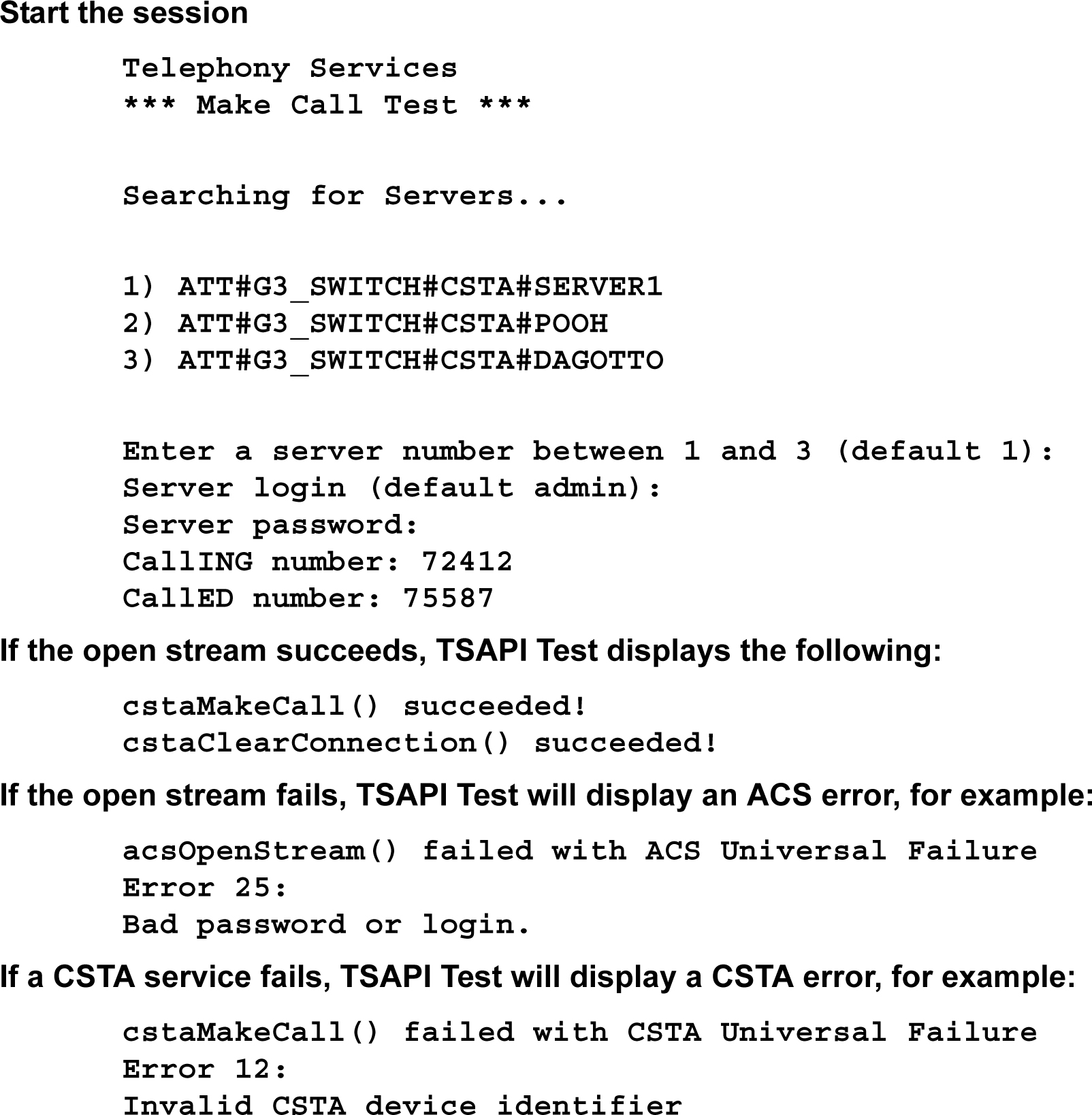
Figure: Sample TSAPI Test session

cstaMakeCall() failed with CSTA Universal Failure
Error 12:
Invalid CSTA device identifier
Send Feedback

Topic navigation

Previous Topic

Using TSAPI Test to verify Linux client installations

Next Topic

Removing the TSAPI Linux client

In this article

STAY CONNECTED

Twitter Youtube Linkedin
Footer Icon
  • Sitemap
  • Terms of use
  • Privacy
  • Cookie Policy
  • Trademarks
  • Accessibility
© 2026 Avaya LLC