

AVAYA DOCUMENTATION CENTER
Find answers to your technical questions and learn how to use our products
Administering the Avaya Aura® Web Gateway
A user gets HTTP error 500 when performing an activate call request
Condition
A user can log in to their client, but cannot perform calls. The client HTTP logs contain an HTTP error 500
incomplete telephone configuration for userentry. The Avaya Aura® Web Gateway nginx access log contains an HTTP error 500 entry for that user.
Cause
The issue might be caused by incorrectly configured Avaya Aura® Device Services dynamic configuration settings on Avaya Aura® Device Services.
Solution
- In your browser, type the following URL:
ADDITIONAL INFORMATION:https://<AADS_FQDN>/acs/resources/configurations/user?username=<USERNAME>In this URL, <AADS_FQDN> is the Avaya Aura® Device Services FQDN and <USERNAME> is the name of the user that gets HTTP error 500.
- Enter the Avaya Aura® Device Services credentials.
STEP RESULT:Avaya Aura® Device Services displays settings configured for the user.
- Ensure that the SET SIP_CONTROLLER_LIST parameter contains one or more System Manager IP address and SIP ports.
- If the SET SIP_CONTROLLER_LIST parameter does not exist or empty, ensure that:
- The SET SIPPROXYSRVR parameter exists and contains the System Manager IP address.
- The SET SIPSECURE parameter exists and is set to either
- .
- The SET SIPPORT parameter exists and contains the System Manager port.
- Ensure that the SET SIPUSERNAME parameter contains the correct user name.
- Ensure that the SET SIPDOMAIN parameter contains the correct user domain.
- If at least one of the parameters listed in steps 3 to 6 does not exist or has an incorrect value, do the following:
- Log in to the Avaya Aura® Device Services web administration portal.
- Navigate to .
- In the Search Criteria area, select User and type the user name.
- In Platform, select the appropriate platform.
- Click Retrieve.
- In Settings, select Group.
- Ensure that the following parameters are configured:
ADDITIONAL INFORMATION:
-
COMM_ADDR_HANDLE_TYPE
-
COMM_ADDR_HANDLE_LENGTH
ADDITIONAL INFORMATION:The following is an example of the configured COMM_ADDR_HANDLE_TYPE and COMM_ADDR_HANDLE_LENGTH parameters: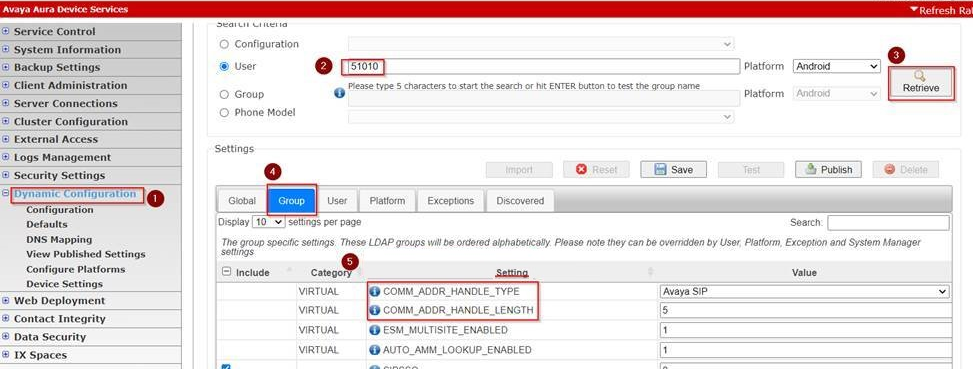
-
- If these settings are not configured, configure the settings as appropriate and publish them for the user group that the user belongs to.
ADDITIONAL INFORMATION:For more information about editing and publishing dynamic configuration parameters on Avaya Aura® Device Services, see the
Administration of the Dynamic Configuration service
chapter in Administering Avaya Aura® Device Services.