DOCSHUB DOCSHUB
  • Library
  • Avaya Support Site Avaya Learning Blogs Videos & Podcasts Knowledge base Report Product bugs
Deutsch English Español (México) Français Français (Canada) Italiano Magyar Nederlands Polski Português (Brasil) Română Русский עברית العربية 中文(简体) 中文(繁體) 日本語 한국어
Login
DOCSHUB DOCSHUB
  • Library
  • Avaya Support Site Avaya Learning Blogs Videos & Podcasts Knowledge base Report Product bugs
  • Deutsch English Español (México) Français Français (Canada) Italiano Magyar Nederlands Polski Português (Brasil) Română Русский עברית العربية 中文(简体) 中文(繁體) 日本語 한국어
Login

Avaya Workplace Client Quick Reference Guide

Table of Contents

Type to filter navigation items by title
  • Mobile platforms
    • Contacts
    • Main menu
    • Call screen
    • History screen
    • Avaya Cloud Services
    • Agent Service screen
  • Desktop platforms
    • Welcome screen
    • Presence and call options
    • Top of Mind
    • Customize your Top of Mind
    • Contacts
    • Start a group conference or chat
    • Video call
    • Conference screen
    • Messaging
    • Avaya Cloud Services
Home
Avaya Workplace Client Quick Reference Guide
History screen

History screen

Share this page

  • On LinkedIn
  • On X
  • On Email

PDF Export Options

  • This Topic
  • Entire Document
Last Updated : Jun 03, 2020 |
Meetings and Collaboration
Workstream Collaboration
Calling and Messaging
Avaya Workplace Client
Job Aid
3.9
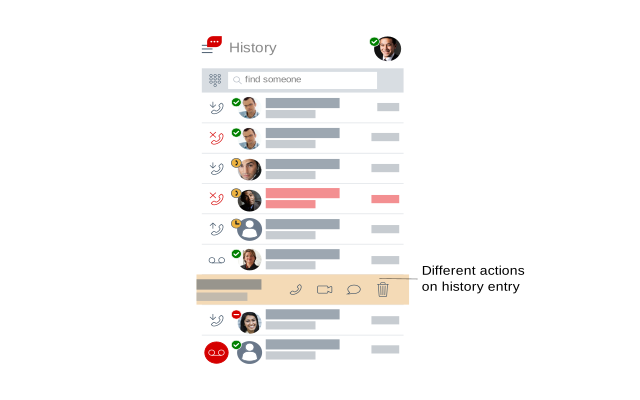
History screen with a callout to view different actions
Send Feedback

Topic navigation

Previous Topic

Call screen

Next Topic

Avaya Cloud Services

In this article

STAY CONNECTED

Twitter Youtube Linkedin
Footer Icon
  • Sitemap
  • Terms of use
  • Privacy
  • Cookie Policy
  • Trademarks
  • Accessibility
© 2026 Avaya LLC