

AVAYA DOCUMENTATION CENTER
Find answers to your technical questions and learn how to use our products
Avaya Room System C190 Quick Start Guide
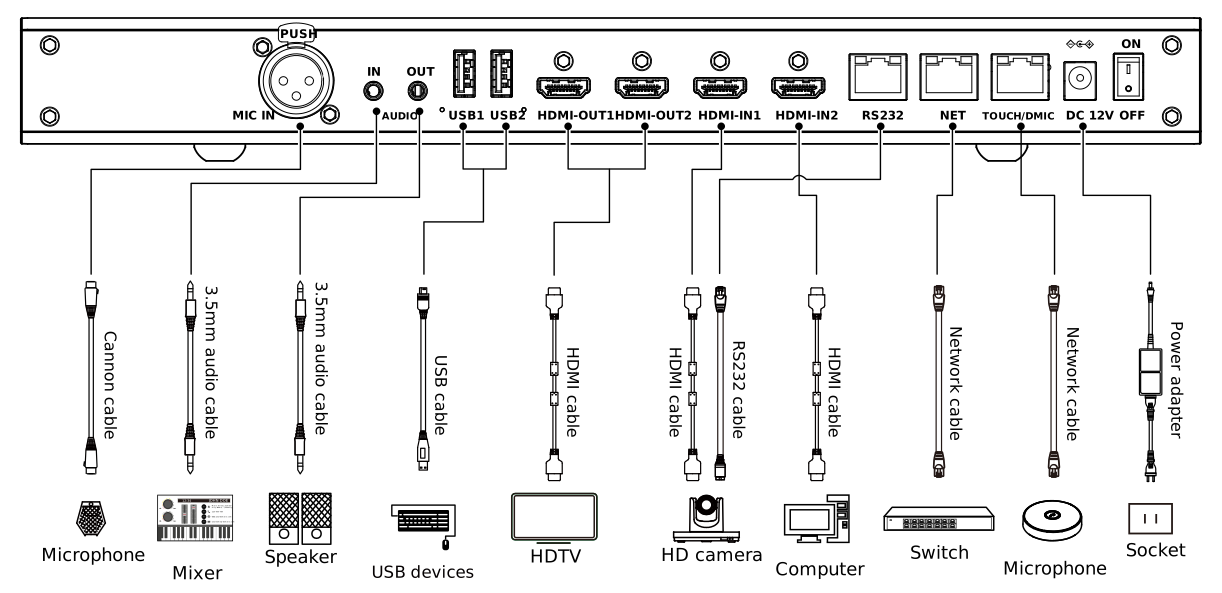
Avaya Room System C190 cables
The following image shows optional configurations and is for reference only. Connect the cables according to your requirements.
Port type |
Description |
|---|---|
Input |
|
First Video Stream Input |
Connect an HD camera to the HDMI IN1 interface to input the first video source. |
Second Video Stream Input |
Connect an HD camera or the second video stream to the HDMI IN2 interface to input the second video source. |
Audio Input |
For audio input, use the following options:
|
USB |
Connect a USB microphone or a USB device, such as a keyboard or mouse. Avaya Room System C190 is compatible with Avaya microphones. For Avaya microphones, you must use the following connection options:
|
Output |
|
Audio Output |
Connect a loudspeaker to the AUDIO OUT interface using a 3.5 mm audio cable. |
First Video Stream Output |
Connect an HDTV to the HDMI OUT1 interface using an HDMI cable. |
Second Video Stream Output |
Connect an HDTV to the HDMI OUT2 interface using an HDMI cable. |
Connectivity and power |
|
Network |
Connect to an Ethernet network using a network cable. |
Power Supply |
Connect Avaya Room System C190 to the power outlet using the supplied power adapter. |