AVAYA DOCUMENTATION CENTER
Find answers to your technical questions and learn how to use our products
Using Avaya Room Microphone RM61 and RM61-EXP
Mounting Avaya Room Microphone RM61 to a wall or ceiling
You can mount Avaya Room Microphone RM61 to a wall or ceiling using the mounting bracket provided in the package.
Before you begin
Ensure that you obtain wall anchors and fasteners corresponding to the type of the mounting surface.
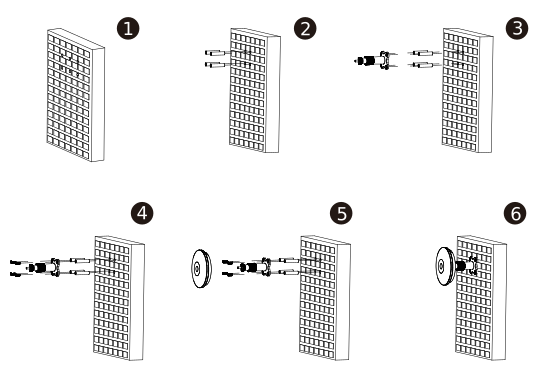
- Locate the area to install the microphone and drill four holes in the wall.
- Install the wall anchors.
- Install the mounting bracket.
- Secure the mounting bracket with fasteners.
- Install the microphone on the mounting bracket.
The following diagram shows a high-level wall-mounting process for Avaya Room Microphone RM61. Number 6 in the diagram shows the wall-mounting result.