

AVAYA DOCUMENTATION CENTER
Find answers to your technical questions and learn how to use our products
Avaya G430 Branch Gateway Overview and Specification
G430 Branch Gateway physical description
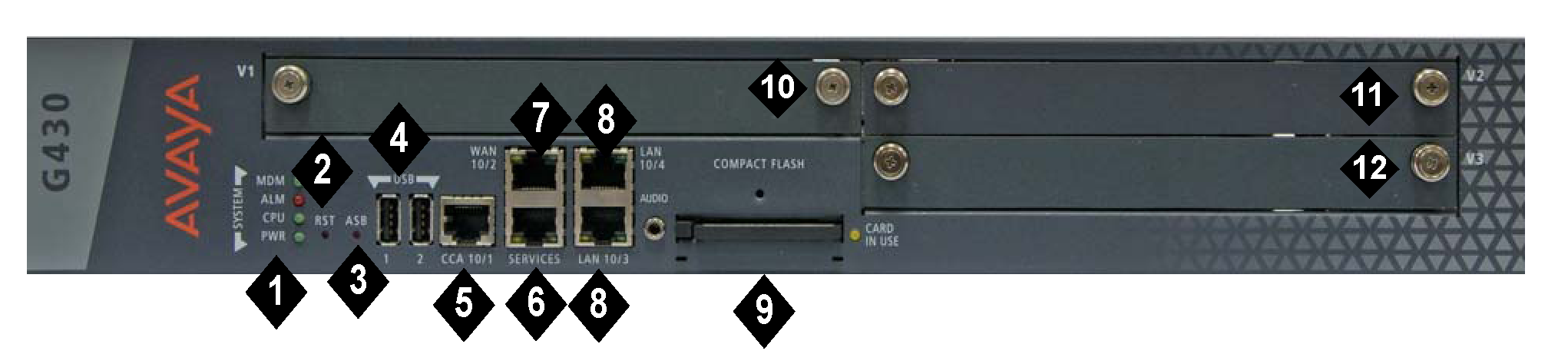
No |
Name |
Description |
|---|---|---|
1 |
System (SYSTM) LEDs |
LEDs that indicate the status of the G430 Branch gateway. |
2 |
RST button |
Reset button. Resets chassis configuration. |
3 |
ASB button |
Alternate Software Bank button. When you simultaneously press the RST button and ASB button simultaneously, G430 Branch Gateway reboots with the software image in the alternate bank. |
4 |
USB ports |
Two USB 2.0 ports with USB connectors. Supports the connection of the following:
|
5 |
CCA (Contact Closure) port |
RJ-45 port for ACS (308) contact closure adjunct box. |
6 |
Services (SVCS) |
Ethernet 10/100 port for services and maintenance access. RJ-45 connector. |
7 |
WAN 10/2 |
One 10/100 Base TX Ethernet WAN port. RJ-45 connector. |
8 |
LAN 10/3 10/4 |
Two 10/100 Base TX Ethernet LAN ports. RJ-45 connectors. 10/100/1000 for hardware vintage 3. |
9 |
Compact Flash (CMPCT FLSH) |
Compact Flash slot. |
10 |
V1 |
Slot for media module or S8300 Server. |
11 |
V2 |
Slot for media module. |
12 |
V3 |
Slot for media module. |