

AVAYA DOCUMENTATION CENTER
Find answers to your technical questions and learn how to use our products
Avaya G430 Branch Gateway Overview and Specification
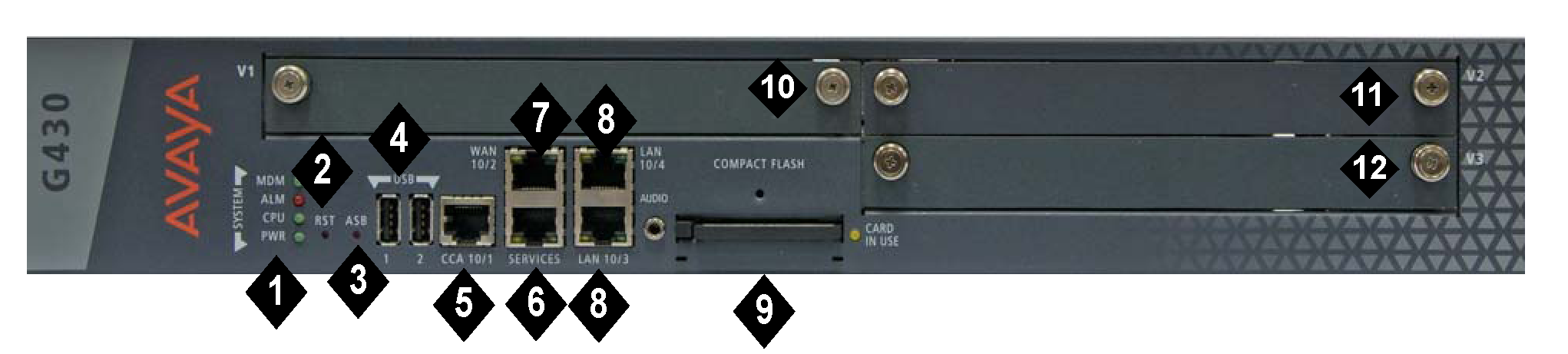
G430 Branch Gateway physical description
|
No
|
Name
|
Description
|
|---|---|---|
|
1
|
System (SYSTM) LEDs
|
LEDs that indicate the status of the G430 Branch gateway.
|
|
2
|
RST button
|
Reset button. Resets chassis configuration.
|
|
3
|
ASB button
|
Alternate Software Bank button. When you simultaneously press the RST button and ASB button simultaneously, G430 Branch Gateway reboots with the software image in the alternate bank.
|
|
4
|
USB ports
|
Two USB 2.0 ports with USB connectors. Supports the connection of the following:
|
|
5
|
CCA (Contact Closure) port
|
RJ-45 port for ACS (308) contact closure adjunct box.
|
|
6
|
Services (SVCS)
|
Ethernet 10/100 port for services and maintenance access. RJ-45 connector.
|
|
7
|
WAN 10/2
|
One 10/100 Base TX Ethernet WAN port. RJ-45 connector.
|
|
8
|
LAN 10/3 10/4
|
Two 10/100 Base TX Ethernet LAN ports. RJ-45 connectors. 10/100/1000 for hardware vintage 3.
|
|
9
|
Compact Flash (CMPCT FLSH)
|
Compact Flash slot.
|
|
10
|
V1
|
Slot for media module or S8300 Server.
|
|
11
|
V2
|
Slot for media module.
|
|
12
|
V3
|
Slot for media module.
|