

AVAYA DOCUMENTATION CENTER
Find answers to your technical questions and learn how to use our products
Administering Avaya Proactive Outreach Manager
Supported formats of day, date, and time for databases in Attribute and System Restrictions
|
Data type
|
Supported Formats
|
|---|---|
|
Day
|
Sunday, Monday, Tuesday, Wednesday, Thursday, Friday, Saturday
|
|
Date
|
|
|
Time
|
|
|
Timestamp
|
|
Based on the configured groups and conditions, POM restricts a contact from being dialed during a campaign.
Support for special keywords in Rule query editor
In the Rule query editor, when defining the rule conditions, you can use the special keywords $NOW and $TODAY for the following data types:
|
Data type
|
Keyword
|
Keyword
|
|---|---|---|
|
DATE
|
$TODAY
|
-
|
|
TIME
|
-
|
$NOW
|
|
TIMESTAMP
|
$TODAY
|
$NOW
|
Important:
$NOW and $TODAY are case-sensitive. Use $NOW or $TODAY with a numeric value.
$NOW
When defining a rule, in a condition that uses an attribute of the
TIME or TIMESTAMP data type, you can use $NOW in the value field.
During rule evaluation, POM replaces $NOW with the current
TIME or TIMESTAMP of the POM server.
POM compares this
TIME or TIMESTAMP with the attribute value of the contact.
Other:
You cannot use $NOW for System values (time).
You can use $NOW+1, $NOW-1, where 1 represents the number of hours to add or subtract from the current time.
-
If the data type is of
TIMEtype, POM evaluates $NOW as the current time. -
If the data type is of
TIMESTAMPtype, POM evaluates $NOW as the current date and time.
Example on using $NOW
Furniture delivery schedule reminder
ABC works, a furniture delivery company, wants to notify its customers about the furniture delivery schedule. The company provides the time value and they expect POM to call the customers three hours ahead of the time value the company provides.
For example, if a delivery is scheduled for 3:00 P.M. on Friday, May 25, 2012, the company expects POM to call the customer at 12:00 noon or as close to 12:00 noon as possible. The company also wants to follow certain time restrictions for making such calls. All calls must be made between 9:00 A.M. and 6:00 P.M. If the delivery is scheduled for 9:00 A.M., POM cannot make the call at 6:00 A.M.
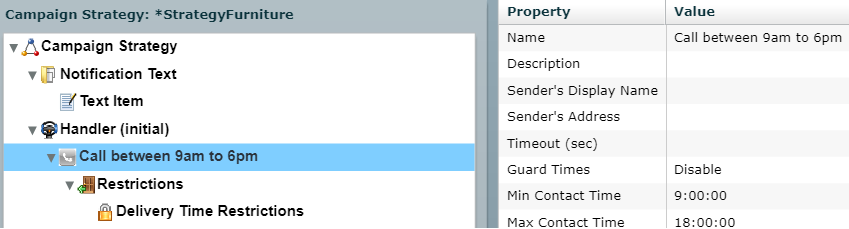
As POM can make calls only between 9:00 A.M. and 6:00 P.M., set it as the Min Contact Time and Max Contact Time in the Call node of the campaign strategy.
Important:
Use $NOW to specify the current time or timestamp. You can use $NOW with attributes of time or timestamp data type. For this example, use the time data type. The sch_time attribute is of the time data type and stores the delivery time of each record.
You can use offsets with $NOW to increment or decrement the value with respect to $NOW. For example, $NOW+3 when compared with the time or timestamp data type, represents current time + 3 hours. Similarly, $NOW+72 when compared with current time represents current time+72 hours.
Applying restrictions for the furniture delivery schedule example
You can handle two schedules for the furniture delivery schedule:
-
Schedules that are more than three hours away
-
Elapsed schedules
Assume that current time is 12:00 hours, that is, $NOW=12:00 hours
Restriction 1
The Calling window shifts with $NOW values, that is, if $NOW=12:00 P.M., POM does not place a call for a delivery scheduled at 4:00 P.M. because the calling window is only three hours. POM places a call to the same contact after 1:00 P.M. You must mark such records as temporary restricted.
Call customers only in the three-hour window prior to delivery schedule.
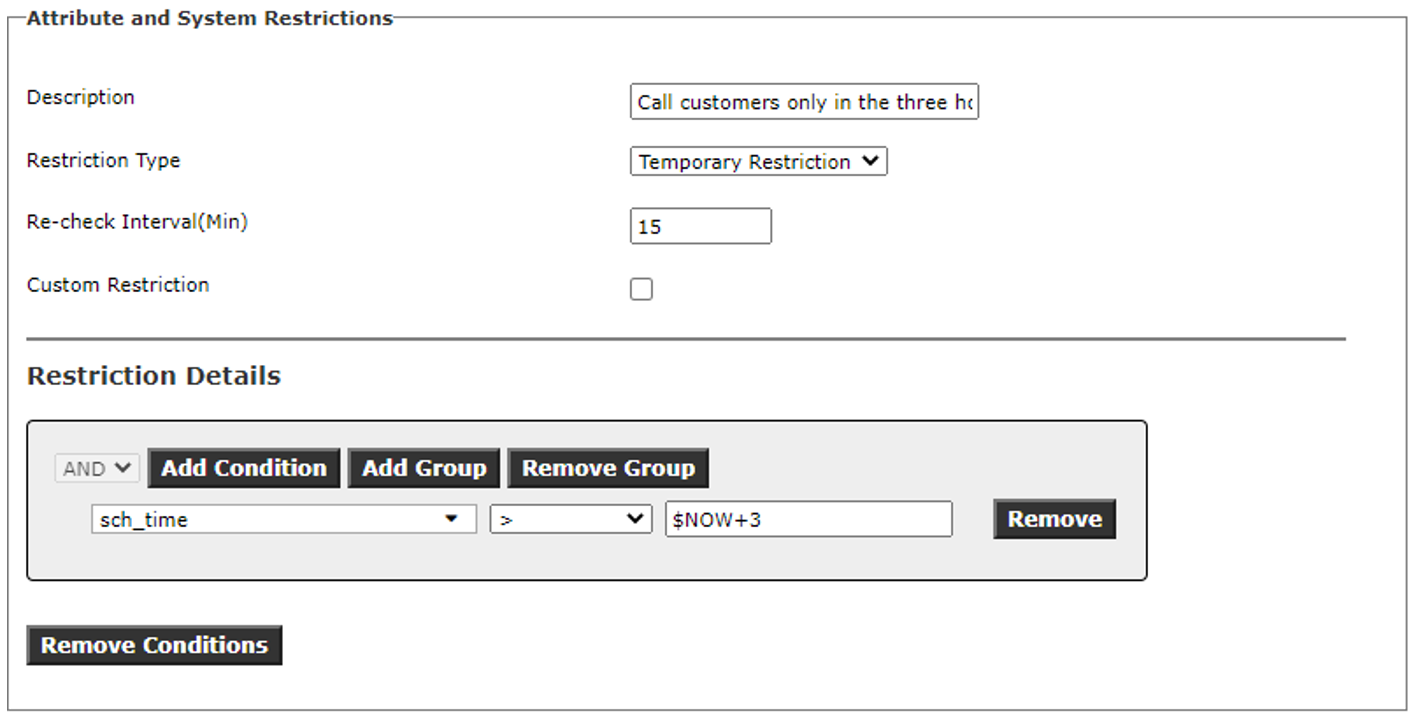
Restrict all schedules which are greater than $NOW+3 or POM must not call until 12:00 hours. For this restriction, set the Restriction Type in the rule as Temporary Restriction. POM marks such record as temporary restricted and retries after every 15 minutes to check if the restriction is still valid for the record. After the restriction condition becomes invalid for the record, POM places a call to the contact record.
Restriction 2
All the records whose delivery time is elapsed must not be called during the campaign.
Call customers only before the delivery schedule.
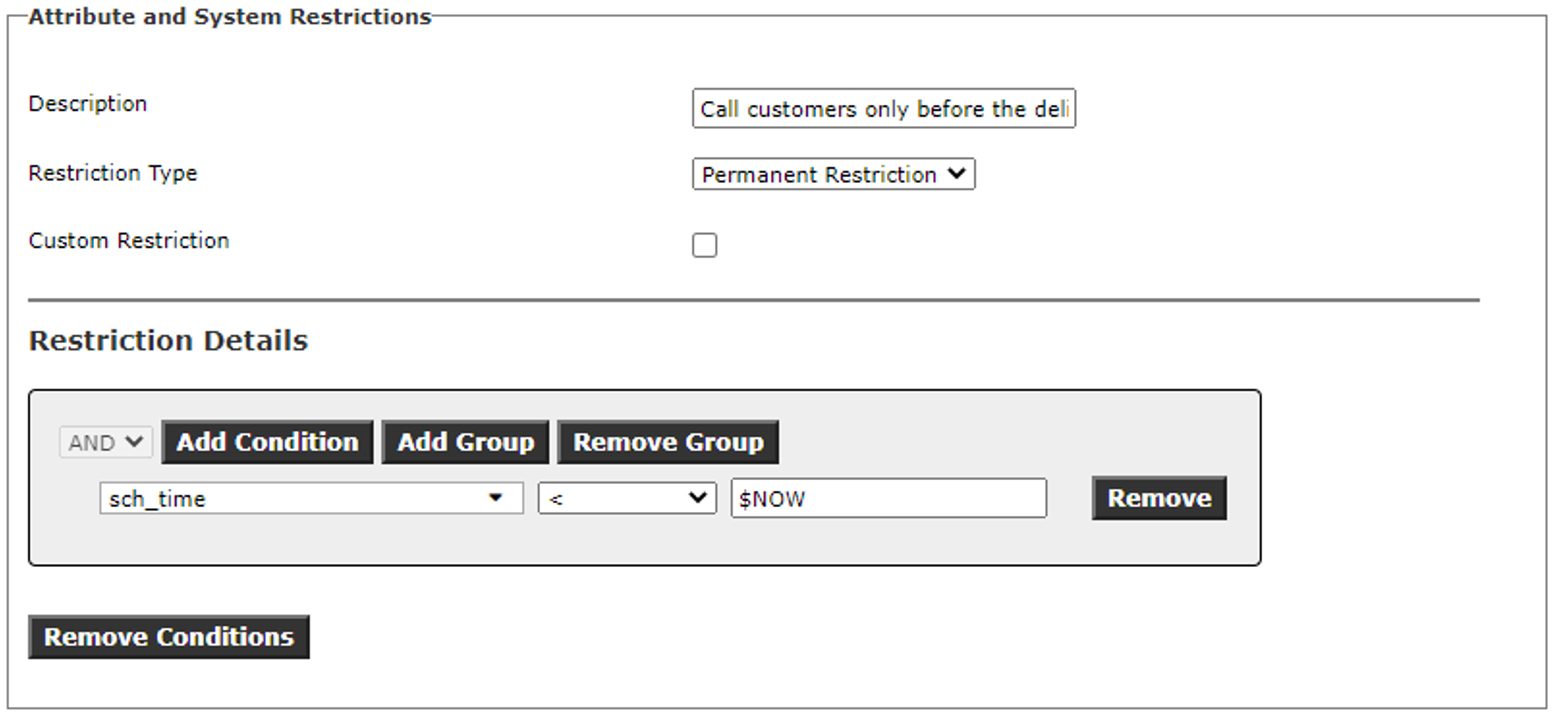
Restrict all schedules which are less than $NOW or POM must not call beyond three hours.
For this restriction, set the Restriction Type in the rule as Permanent Restriction. POM marks the record with the Restricted Other completion code and does not retry this record.
$TODAY
When defining a rule, in a condition that uses an attribute of the
DATE or TIMESTAMP data type, you can use $TODAY in the value field.
During rule evaluation, POM replaces $TODAY with the current
DATE or TIMESTAMP of the POM server.
POM compares this
DATE or TIMESTAMP with the attribute value of the contact.
Other:
You cannot use $TODAY for System values (date).
Examples of the usage of $TODAY
Example 1
You can use $TODAY+1 or $TODAY-1, where 1 represents the number of days to add or subtract from the current date.
If the data type is of the
DATE type, POM does the following actions:
-
POM evaluates
$TODAYas the current date. -
POM evaluates
$TODAY+1as one day after the current date. -
POM evaluates
$TODAY-1as one day before the current date.
Example 2
You can use $TODAY+x, $$TODAY-x, where x represents the number of days to add or subtract from the current date.
If the data type is of the
DATE or the TIMESTAMP type, POM does the following actions:
-
POM evaluates
$TODAYas the current date. -
POM evaluates
$TODAY+xas the number of days after the current date. -
POM evaluates
$TODAY-xas the number of days before the current date.