

AVAYA DOCUMENTATION CENTER
Find answers to your technical questions and learn how to use our products
Avaya Solutions Platform 130/S8300 Overview and Specification
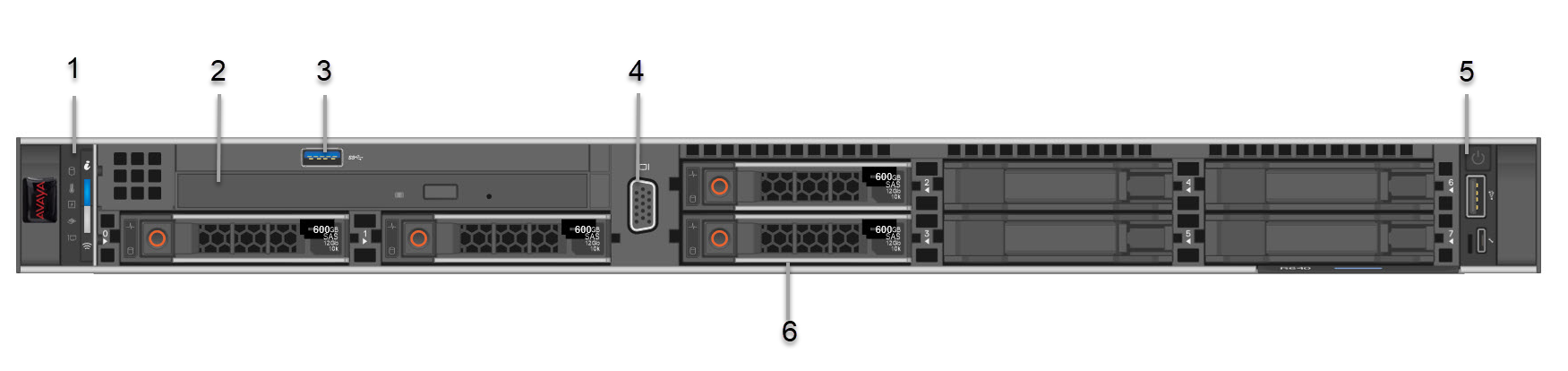
Front view of Dell™ PowerEdge™ R640 Server
|
No.
|
Item
|
Icon
|
Description
|
|---|---|---|---|
|
1
|
Left control panel
|
NA
|
Displays the system health, system ID, and status LED indicators.
|
|
2
|
Optical drive
|
N/A
|
One slim SATA DVD-ROM drive.
Note:
DVD devices are data only.
|
|
3
|
USB port
|
 |
The USB port is USB 3.0 compliant.
|
|
4
|
VGA port
|
 |
Enables connection to the display device (console) of the system.
|
|
5
|
Right control panel
|
NA
|
Contains the power button, USB port, iDRAC Direct micro port, and the iDRAC Direct status LED.
|
|
6
|
Drive slots
|
NA
|
Enables installation of hard disk drives (HDDs) that are supported on your system.
|