

AVAYA DOCUMENTATION CENTER
Find answers to your technical questions and learn how to use our products
Using Avaya Room Microphone RM61 and RM61-EXP
Overview
Avaya Room Microphone RM61 and Avaya Room Expansion Microphone RM61-EXP accurately capture audio in your meeting room. Use this quick start guide to install the RM61 microphone and connect it to an Avaya Room System C100 Series codec.
You can connect multiple RM61 microphones to capture audio from various room sizes. You can also connect an RM61 microphone to an external microphone or speakers.
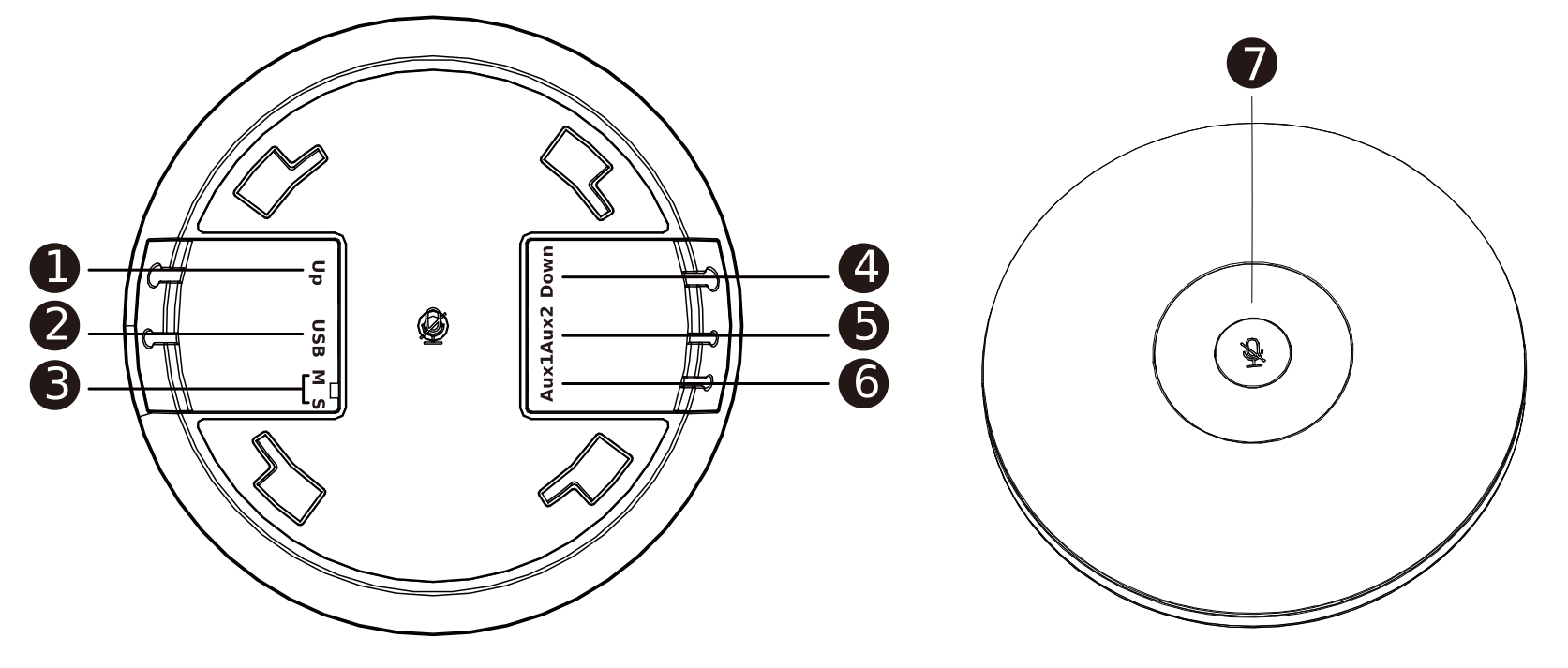
No. |
Name |
Description |
|---|---|---|
1. |
Up |
RJ45 Ethernet connection towards the codec DMIC port. |
2. |
USB |
USB Type-C interface for powering the microphone. |
3. |
M/S |
Not used. Leave in the M position. |
4. |
Down |
RJ45 connection to a downstream RM61 expansion microphone. |
5. |
Aux2 |
3.5mm port for audio analog connection to an external microphone and speakers. |
6. |
Aux1 |
3.5mm port for analog connection to external speakers. |
7. |
Mute button |
|