AVAYA DOCUMENTATION CENTER
Find answers to your technical questions and learn how to use our products
Installing and Administering Avaya Vantage™ in an Avaya Aura® or IP Office Environment
Bridged call appearance configuration
In an Avaya Aura® environment, you can use the Bridged Call Appearance feature through the Avaya Vantage™ built-in UC experience and the Avaya Connect Expansion Module application.
A bridged call appearance is an appearance of a primary phone number on a different extension. You can use the bridged call appearance to make and receive calls on behalf of the primary number owner. You can also join an ongoing call to or from the primary number.
For example, for extension A, as the primary number, to also have call appearances on extensions B, C, and D, you must use System Manager to access B, C, and D and bridge each of them to extension A. After you complete the required configurations, users of extensions B, C, and D can see the call appearance of extension A on their Avaya Vantage™ built-in UC experience.
Configuration tasks
The following are the high-level tasks to set up a bridged call appearance on an Avaya Vantage™ built-in UC experience user extension:
Use the 46xxsettings file to set the MULTILINESTAT parameter value to 1. With this setting, the device user can select a call appearance on the built-in UC experience to make outgoing calls.
When you set this parameter value to 0, the default setting, the user does not see an option to select a call appearance on the built-in UC experience. The built-in UC experience does not provide an option to select a call appearance even if the user extension has call appearances configured of other phone numbers.
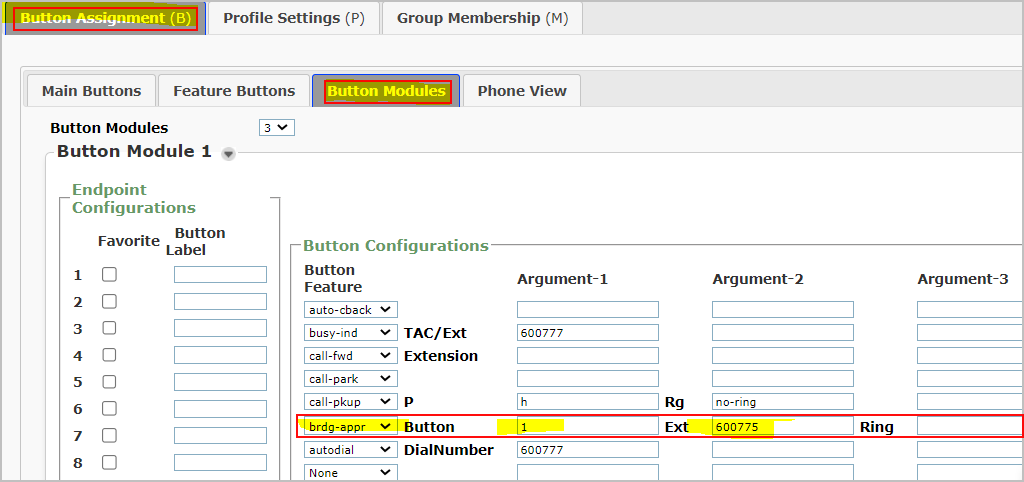
Assign a bridged call appearance feature button of the primary extension to the user extension through the System Manager web console.
Note:
The Avaya Vantage™ built-in UC experience can support only one appearance of a multi-appearance telephone user as a bridged call appearance. Avaya recommends using the first appearance of the multi-appearance telephone as the bridged call appearance.
For the call appearance feature to work smoothly, set up a maximum of three call appearances on an Avaya Vantage™ user extension.
Administering a bridge call appearance through System Manager
About this task
Use this procedure to add a bridged call appearance of a primary extension on another user extension through the System Manager web console. For example, configure the bridged call appearance of the extension of the boss on the secretary's extension.
Procedure
- In the Ext field, enter the primary extension to add its bridged appearance to the selected extension.
For example, enter the extension of the boss to add its bridged call appearance on the secretary's device.