

AVAYA DOCUMENTATION CENTER
Find answers to your technical questions and learn how to use our products
Avaya Call Management System Security
Using SSH and telnet
When logging on using the CMS Supervisor PC Client, Secure Shell (SSH) is the default connection. On the PC Client, an SSH client package creates the SSH tunnel and encrypts and decrypts the SSH connection. Also, the Microsoft Crypto API provides password encryption and decryption functionalities. The login and password information stored in the registry is encrypted.
The following figure illustrates the connectivity between the various components:
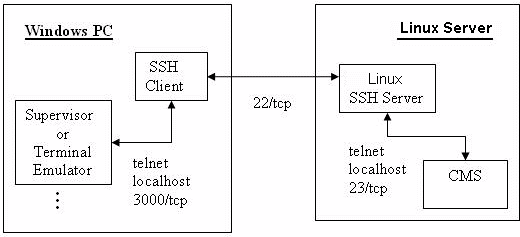
The PC Client uses an SSH wrapper around the underlying telnet. Thus, telnet cannot be disabled on the CMS server when using the PC Client.
To improve telnet security on the CMS server, the telnet service can be locked down to only be used by the local host by editing the following files:
/etc/hosts.allow
Add the following lines:
# allow telnet only from within the server
in.telnetd : localhost
/etc/hosts.deny
Add the following lines:
# deny all telnet except as specified in hosts.allow
in.telnetd : ALL
Other points to consider:
Although the telnet service runs on the CMS server, it is configured so that any attempt to gain access to port 23 from outside the system results in a connection refused message.
In CMS, the Windows SSH clients and SSH server negotiate the encryption algorithm at run time. A variety of industry-standard algorithms, such as 128/256-bit AES, 3des, chacha20, RC4, and key lengths are provided as a result of including an SSH client. The specific algorithm is negotiated between the client and the server. The selection of an algorithm takes place at run time. SSH uses RSA or DSA. CMS servers use SSH Protocol 2. The default encryption method for RHEL is SHA512. See the following file for the current ENCRYPT_METHOD value:
/etc/login.defs
Beginning with CMS Release 19.2, direct root SSH connections are not allowed. This update is for security purposes.
Supported Key Exchange (kex) algorithms have been reduced for security purposes.