

AVAYA DOCUMENTATION CENTER
Find answers to your technical questions and learn how to use our products
Using IP Office 1603 Phones
Navigation
The following image shows the key controls on the phone.
Some features described in this document might not be available on your phone. If you find that a feature is not available, contact your system administrator.
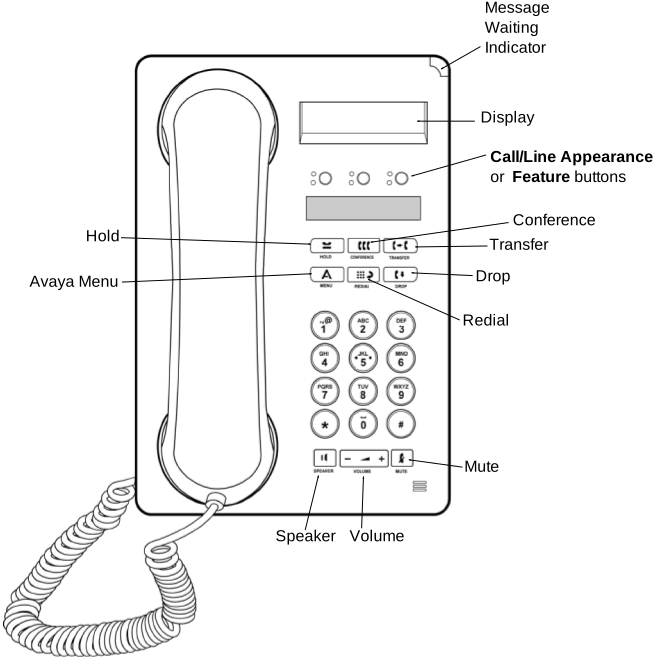
Phone controls |
Description |
|---|---|
Message Waiting Indicator (MWI) |
An illuminated red light in the upper-right corner of your phone indicates you have voice mail messages waiting. If Visual Alerting is enabled, this light flashes when you receive an incoming call. |
Avaya menu |
Press the A button to access the Avaya menu. See Avaya menu. Press the button again to exit the Avaya menu. |
Redial button |
Press to dial the last number you called. |
Hold button |
Press to put the active call on hold. |
Conference button |
Press to add another party to an existing call. |
Transfer button |
Press to transfer a call to another number. |
Drop button |
Press to drop the active call. While on a conference call, press Drop to drop the last person added to the conference call. |
Volume button |
Press + or - while active on the handset or speaker to adjust the volume. To adjust the volume of the ringer, press + or - on the Volume button while the handset and speaker are inactive. |
Mute button |
Press to mute a call in progress. To take a call off mute, press Mute again. |
Speaker button |
Press to use the speaker phone. To take a call off speaker phone, lift the handset. |
Feature and Call appearance buttons |
There are three buttons that can be programmed by the system administrator as either Call appearance or Feature buttons. Press a Call appearance button to make or answer a call or resume a call on hold. Press a labeled feature button to enable or disable that feature. Typically, two buttons are administered as Call appearance buttons and one button is administered as a Feature button. The Feature button provides access to an Avaya call management system feature that has been administered for your extension. The green LED next to the Feature button indicates if the feature is currently on or off. If the light is on, the feature is on. |