AVAYA DOCUMENTATION CENTER
Find answers to your technical questions and learn how to use our products
Avaya Aura® Media Server Overview and Specification
About Avaya Aura® MS
Avaya Aura® MS delivers advanced multimedia processing features to a broad range of products and applications. The media server uses the latest open standards for media control and media processing. Avaya Aura® MS is a highly scalable, software-based solution that deploys on standard server hardware running Linux.
Avaya Aura® MS is always deployed with another Avaya product or application referred to as the adopting product. Adopting products use Avaya Aura® MS media processing features by employing Media Server Markup Language (MSML) to control and invoke various services on the media server. MSML is transported over either SIP or REST, depending on the adopting product. See adopting product documentation for proper Avaya Aura® MS configuration. Adopting product examples include:
Avaya Experience Platform® On-Prem (AXP On-Prem, formerly Avaya Aura® Call Center Elite)
Avaya Aura® Communication Manager
Avaya Aura® Web Gateway
Avaya Breeze® platform
Avaya Equinox® Conferencing
Avaya Oceana®
Avaya Spaces
Avaya Session Border Controller
Avaya Aura® MS offers the following deployment options:
-
Virtual Appliance (ESXi based):
Deploy using VMWare® ESXi: The Avaya Aura® MS application and an optimized Linux® OS are packaged as an OVA that may be deployed to VMWare® ESXi. For more details, see Deploying and Updating Avaya Aura® Media Server Appliance.
Virtual Appliance (ASP 130 KVM based)
Deploy using ASP 130 with KVM on Red Hat® hypervisor: The Avaya Aura® MS application and an optimized Linux® OS are packaged as a QCOW2 image along with an interactive installer script that may be deployed to a ASP 130 with KVM on Red Hat® hypervisor. For more details refer to Deploying and Updating Avaya Aura® Media Server Appliance.
Physical Appliance: The Avaya Aura® MS application and an optimized Linux® OS are preinstalled on Avaya Standard Platform (ASP) 100 series hardware server platform. For more details refer to Deploying and Updating Avaya Aura® Media Server Appliance.
Software Application: The customer supplies a platform with a configured Linux OS and uses the Avaya Aura® MS software installer to install and configure the media server application. For more details refer to Installing and Updating Avaya Aura® Media Server Application.
Embedded: The Avaya Aura® MS application is installed within another Avaya product, for example Equinox® Media Server. For more details refer to the Avaya product documentation.
In addition, the Avaya Aura® MS software installer can be used to install the media server application on the following virtual and cloud platforms:
Amazon Web Services (AWS)
Google Cloud Platform
IBM Cloud
Kernel-based Virtual Machine (KVM)
Microsoft Azure
Microsoft Hyper-V
Nutanix Acropolis Hypervisor (AHV)
Avaya Aura® Media Server provides different services depending on the server profile that is configured. The following server profiles are supported:
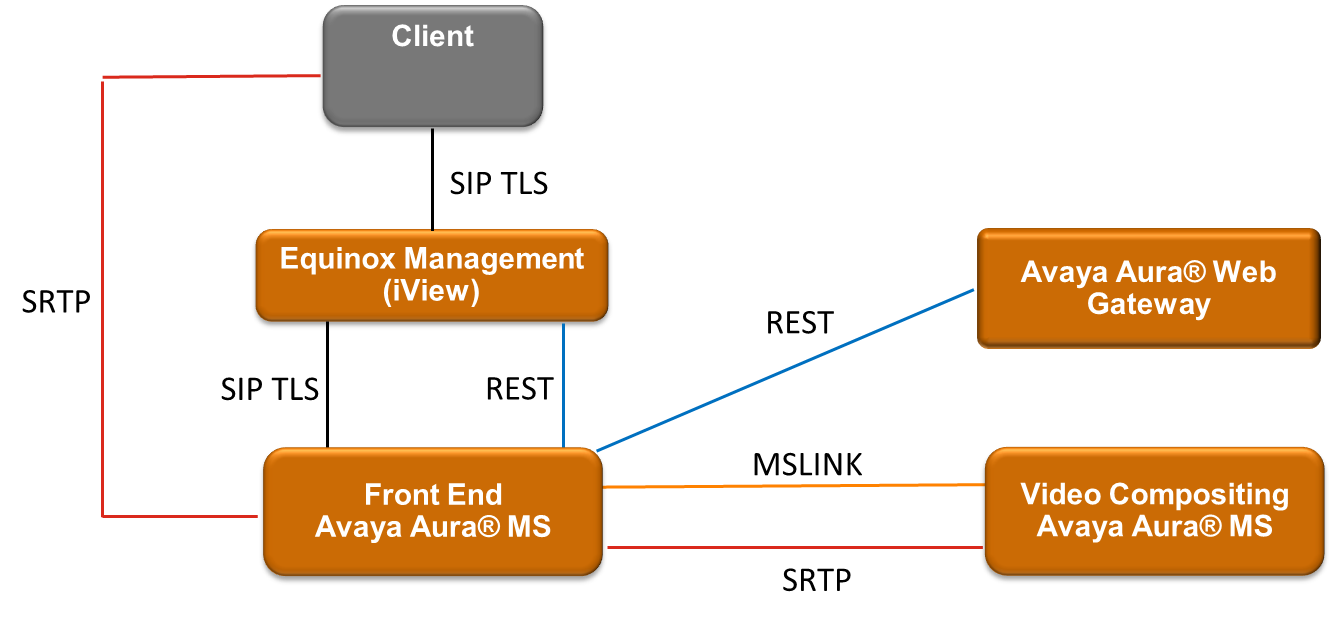
Default: This is the default profile used in all deployments and is also referred to as the Front-End MS.
Video Compositor: This profile is referred to as Video Compositing MS and is required for deployments requiring video processing. When this profile is configured the media server is dedicated to performing video compositing services.
The following example shows both profile types deployed within Avaya Equinox Conferencing Team Engagement solution.