

AVAYA DOCUMENTATION CENTER
Find answers to your technical questions and learn how to use our products
Avaya Aura® Media Server Overview and Specification
Virtual Machine MPU Estimation
Example 1
A custom virtual machine may be an appliance using a non-standard profile, or a software install on a customer supplied OS within a virtual machine. For appliance deployments on VMware, you must use one of the pre-defined VMware profiles and the associated MPU estimates. As we introduce new decomposed video processing features on Avaya Aura® MS, we will relax this requirement for select deployment types. When deploying a custom VM the number of vCPU’s must always be even and should adhere to the following guidelines:
Installation Type |
vCPU’s (even only) |
RAM (min) |
Disk (min) |
IOPS |
NIC |
|---|---|---|---|---|---|
Software Only (PVI) |
4 |
4.5 GB |
50 GB |
100 |
>= 1Gbps |
Software Only (PVI) |
6 |
8 GB |
50 GB |
100 |
>= 1Gbps |
Software Only (PVI) |
8 |
8 GB |
50 GB |
100 |
>= 1Gbps |
Software Only (PVI) |
10 |
16 GB |
50 GB |
100 |
>= 1Gbps |
Software Only (PVI) |
12 |
16 GB |
50 GB |
100 |
>= 1Gbps |
Software Only (PVI) |
14 |
16 GB |
50 GB |
100 |
>= 1Gbps |
Software Only (PVI) |
16 |
16 GB |
50 GB |
100 |
>= 1Gbps |
Software Only (PVI) |
>= 18 |
32 GB |
50 GB |
100 |
>= 1Gbps |
The following method can be used to estimate the MPU rating of a custom virtual machine on a properly configured host.
First, determine the type of hypervisor utilized:
If it is VMware, utilize one of the existing pre-defined VMware profiles and associated MPU estimates. If you require a VM size that is not pre-defined and your deployment type has been cleared with the Avaya Aura® MS team, follow this guide, but use physical cores in variable L in place of logical processors.
If its KVM (also used by Google Compute Engine), XEN (also used by Amazon EC2), Nutanix AHV or Hyper-V, these hypervisors expose hyperthreaded cores through to their guests. For this reason, you cannot use the VMware profiles and MPU ratings.
Second, determine the type of processor utilized by the host.
Take note of the CPU type, and the number of CPUs installed (sockets) if possible.
If you don't know how many CPUs are installed on the host, assume a dual configuration (two).
Lookup the number physical cores and logical cores using the CPU type.
Next, decide how many vCPUs you wish to allocate to Avaya Aura® MS.
Finally, lookup the CPU Mark of the installed CPU as described in the previous section.
If the number of vCPUs is less than or equal to the number of logical processors on a single CPU (socket) use the single CPU PassMark® score instead of the dual.
Now you can calculate the MPU estimate for the VM.
The formula is:
Let C = CPU Mark Score
Let F = Conversion Factor = 5.8
Let L = Number of logical processors
Let V = Number of vCPUs to allocate
Let P = Penalty for virtualization = 0.8
Let M = MPU Estimate
M = (C / F / L * V * P)
First example if you wish to run Avaya Aura® MS on a KVM hypervisor. You want to assign 6 vCPUs.
The hypervisor is using dual Intel E5-2630v3 processors at 2.4GHZ. Each processor is 8 physical cores, 2 logical per physical. It has 16 logical processors per CPU, 32 in total.
Since we want to assign 6 vCPUs, this will easily fit within one CPU, so we will use the single CPU PassMark® score.
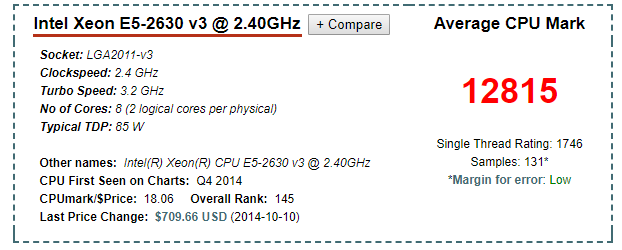
The CPU mark score for this CPU is 12,815.
Now assign the variables:
Let C = CPU Mark Score = 12,815
Let F = Conversion Factor = 5.8
Let L = Number of logical processors = 16
Let V = Number of vCPUs to allocate = 6
Let P = Penalty for virtualization = 0.8
(C / F / L / * V * P) = M
12815 / 5.8 / 16 * 6 * 0.8 = 663 MPU
In this example, the 6 vCPU VM would have a conservative MPU rating of 663. Keep in mind with this hypervisor (KVM), hyperthreading is exposed to the guest, so 6 vCPUs will map to 3 physical cores/6 logical.
Second example you wish to run an Avaya Aura® MS compositor on VMware consuming 20 vCPUs. The hypervisor is running a dual Intel E5-2680v3 processor at 2.5GHZ. Each processor has 12 cores/24 threads for a total of 48 logical processors.
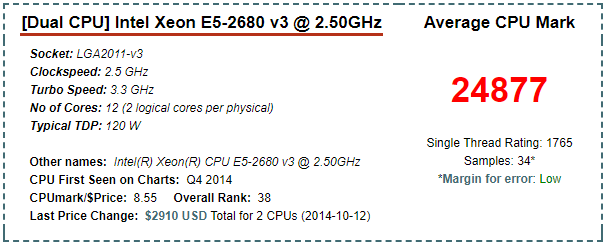
The CPU mark score for this CPU is 24,877.
Now assign the variables:
Let C = CPU Mark Score = 24,877
Let F = Conversion Factor = 5.8
Let L = Number of logical processors = 24 <-- 24 is used here instead of 48 because this is VMware.
Let V = Number of vCPUs to allocate = 20
Let P = Penalty for virtualization = 0.8
(C / F / L / * V * P) = M
24877 / 5.8 / 24 * 20 * 0.8 = 2859 MPU
In this example, the 20 vCPU VM would have a conservative MPU rating of 2,859.