AVAYA DOCUMENTATION CENTER
Find answers to your technical questions and learn how to use our products
Working with Avaya Session Border Controller Multi-Tenancy
Topology
Configuration example 1 : Multi-tenancy using multiple tenants, call servers, and Avaya SBC interfaces
This section explains some ways that tenants can be configured on Avaya SBC.
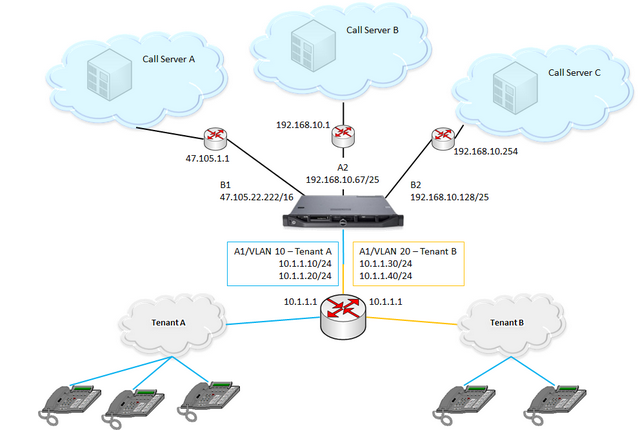
The following scenario uses all four Avaya SBC data interfaces. Avaya SBC connects to two tenant networks, each with a unique set of remote workers. Avaya SBC also connects to three other networks, each with a call server. Each call server is reached through a separate physical interface, which provides a measure of redundancy when one or more call servers stop responding.
Configuration Example 2 : Multi-tenancy using the same IP address
Avaya SBC supports the use of the same IP address on multiple data interfaces in Avaya SBC. Customers often share the same address space and service IP address while using multitenant and cloud features. With support for using the same IP address more than one time, more than one customer can use the same IP address to connect to Avaya SBC.
To permit the use of multiple instances of the same IP, the instances must exist on separate network interfaces, virtual network interfaces, or both. Avaya SBC separates interface definition from network definition as follows:
An interface is a combination of a physical port such as A1, A2, B1, and B2, and a vlan ID. A vlan ID can be no vlan.
A network ties a set of Avaya SBC IPs and gateways with an interface.
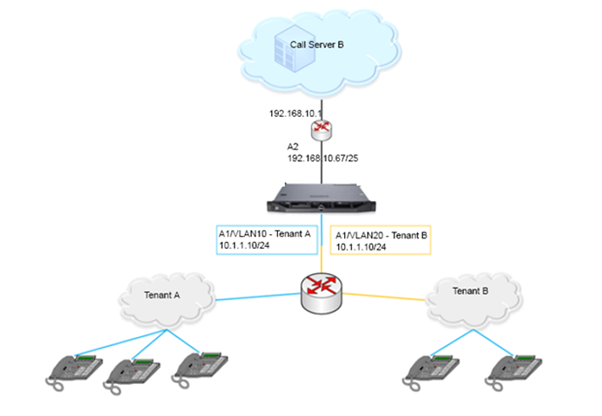
Therefore, for two instances of 1.2.3.10 on Avaya SBC, you must define two interfaces and two networks, so that 1.2.3.10 occurs exactly once within each network.
In this scenario, Avaya SBC connects to two tenant networks, each with a unique set of remote workers. However, the same IP address is assigned on Avaya SBC on both the tenant networks.