AVAYA DOCUMENTATION CENTER
Find answers to your technical questions and learn how to use our products
Configuring Avaya Breeze® platform with an Independent System Manager
Creating an implicit user rule
About this task
Create the implicit user rule on the Avaya Aura® System Manager. The implicit user rule creates a numeric pattern that the Avaya Aura® System Manager monitors. When a call matches the pattern, the Avaya Aura® System Manager routes the call to Avaya Breeze® platform.
Procedure
- On the System Manager web console, click .
- Click New.
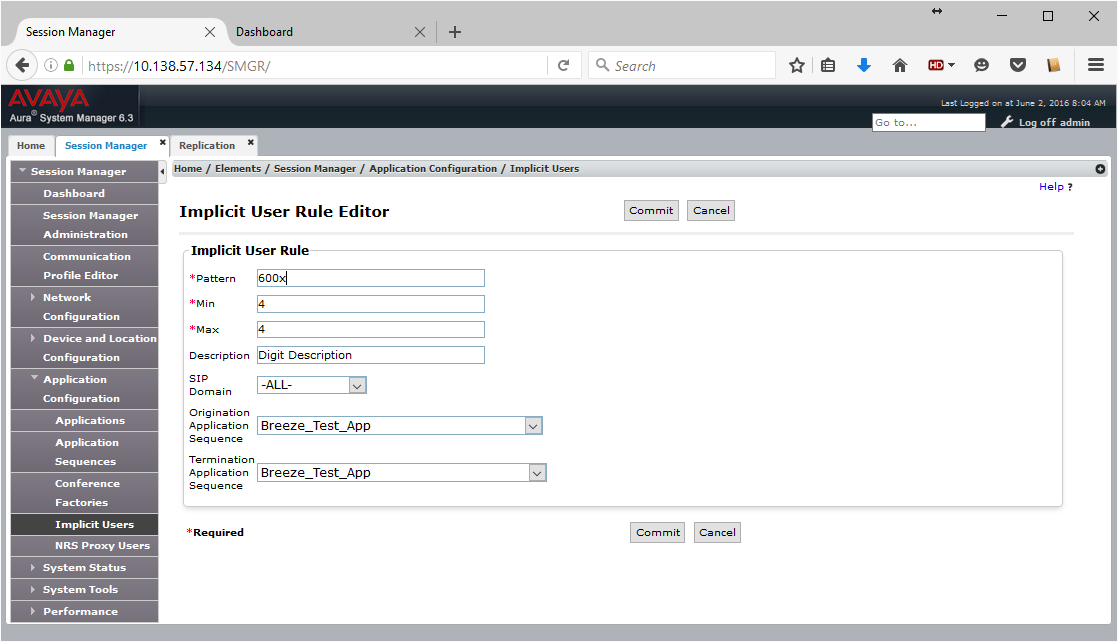
- On the Implicit User Rule Editor page, enter the appropriate information.
- Click Commit.
Example
For example in the rule below, the Avaya Aura® System Manager will look for a four-digit pattern starting with 600x (6000-6009) in all configured SIP domains. Configure your Avaya Breeze® platform Test App for both originating and terminating application sequences. Any call originating from a station matching 600x or anyone calling a station matching 600x will route to the Avaya Breeze® platform node identified in the application sequence.