AVAYA DOCUMENTATION CENTER
Find answers to your technical questions and learn how to use our products
GIS Terminology Checker Process
Verifying the content
About this task
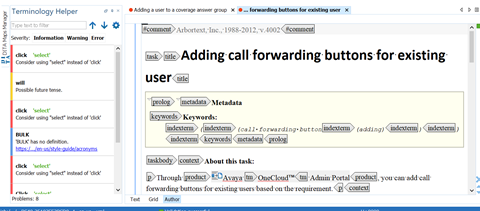
When you open or check out a topic with Oxygen XML Author, it flags content that does not meet the defined Avaya Customer Documentation style. You can step through the flagged content and resolve the issues in the topic.
Important:
Always run the terminology checker on topics before sending them for SME or Editorial review.
Procedure
- Check out or open the topic that you want to verify in Oxygen XML Author.
On the left pane, Terminology Helper lists errors, warnings, and additional information.