

AVAYA DOCUMENTATION CENTER
Find answers to your technical questions and learn how to use our products
Getting started with Documentation tools
Adding repository and SDL account in Tridion Docs
About this task
To access Tridion Docs repository, add your unique user account information in SDL Tridion Docs Publication Manager.
Note:
SDL is the older name for RWS.
Before you begin
Install Tridion Docs Publication Manager and Authoring Bridge.
Request Information Architect to create your SDL account user name and password and keep the credentials handy.
Procedure
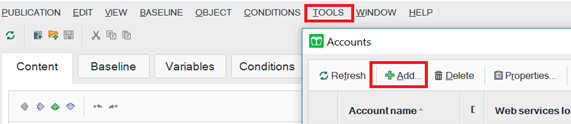
- Click and when the Accounts dialog box opens, click Add.
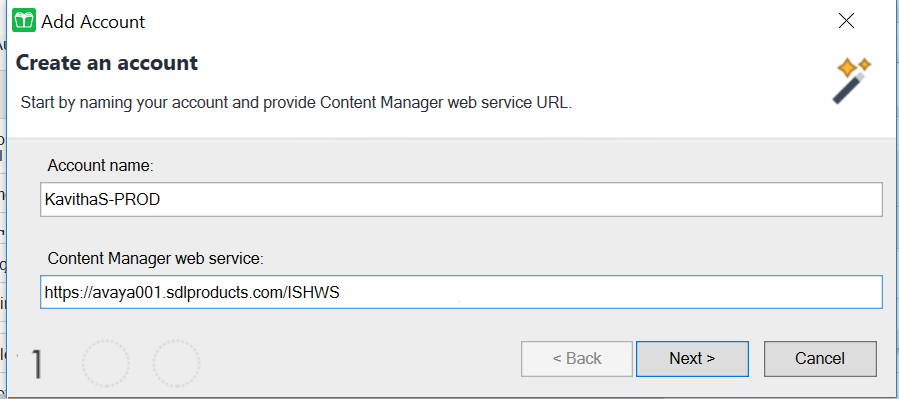
- On the Add Account dialog box:
- In the Content Manager web service field, type https://avaya001.sdlproducts.com/ISHWS
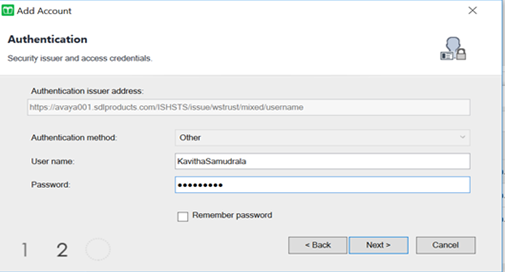
- In the Username and Password fields, provide your RWS account username and password that you received from Information Architect or the DITA mentor.
- In the Content Manager web service field, type https://avaya001.sdlproducts.com/ISHWS
Next Steps
When the installation and account setting is complete:
To open Publication Manager, go to Windows Start, and click .
To access the Tridion Docs web client, go to https://avaya001.sdlproducts.com/ISHCM and log on using your Tridion Docs credentials.