

AVAYA DOCUMENTATION CENTER
Find answers to your technical questions and learn how to use our products
Getting started with Documentation tools
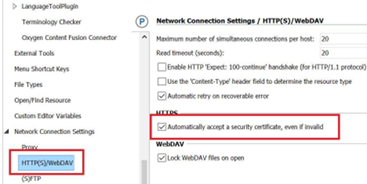
Setting the HTTP(S)/WebDAV preferences on Oxygen XML Author
You must set the network connectivity preferences and install the Terminology Checker plug-in only once. When new rules are added, and existing rules are updated, the files are automatically copied to your local folder.
- Open Oxygen XML Author.
- From the menu, click to open the Preferences dialog box.
- Click and select the Automatically accept a security certificate, even if invalid check box.
ADDITIONAL INFORMATION:
- Click OK.