

AVAYA DOCUMENTATION CENTER
Find answers to your technical questions and learn how to use our products
Installing the IP Office Anywhere Demonstration Software
Network Specification
The IP Office Demo service installs with a configuration that matches the following setup. Following installation, you can change the configuration if required.
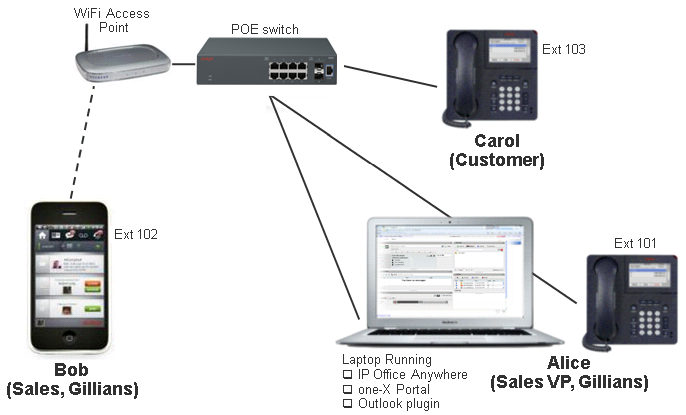
Device settings
Device |
Extension |
IP Address |
Mask |
Call Server |
|---|---|---|---|---|
Computer / Softphone |
101 |
192.168.42.1 |
255.255.255.0 |
192.168.42.230 |
IP Phone 1 |
102 |
192.168.42.102 |
||
IP Phone 2 |
103 |
192.168.42.103 |
||
WiFi Ethernet adapter |
N/A |
192.168.42.2 |
||
Mobility Client |
TBD |
192.168.42.112 |
192.168.42.230 is the IP address of the IP Office Demo virtual machine running on the Windows PC.
When you set the Windows PC IP address to 192.168.42.1, set its default gateway to 192.168.42.230.
System logins and passwords
The ports and paths below are relative to https://192.168.42.230 (the IP Office Demo server IP address).
System |
Port and Path |
Login |
Password |
|---|---|---|---|
IP Office Manager |
– |
Administrator |
Administrator |
IP Office Web Manager |
7070 |
||
Web Control |
7071 |
||
Avaya one-X® Portal Admin |
8080/onexportal-admin.html |
Administrator |
password |
Avaya one-X® Portal User |
8080/onexportal.html |
Alice |
101 |
Bob |
102 |
||
Carol |
103 |