

AVAYA DOCUMENTATION CENTER
Find answers to your technical questions and learn how to use our products
Deploying Avaya IP Office Platform SSL VPN Services
Using the On-boarding Express SDK
SSL VPN Configuration Process using the On-boarding Express SDK
|
1
|
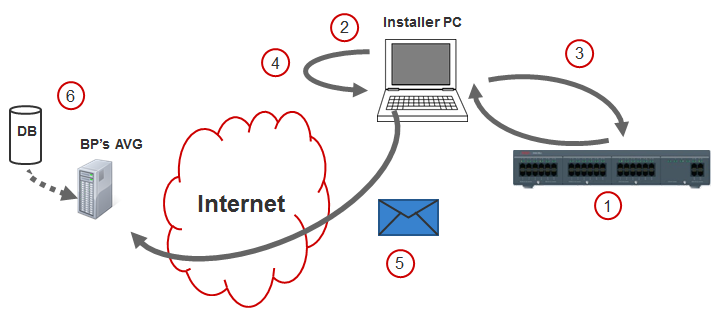
Configuring the following IP Office settings.
|
|
2
|
Run the On-boarding Express SDK tool.
|
|
3
|
The On-boarding Express SDK tool exchanges files with IP Office.
|
|
4
|
The On-boarding Express SDK tool creates a zip file containing all the files required for on-boarding.
Repeat steps 1–3 for all IP Office systems.
|
|
5
|
Securely transfer zip files to the Partner site. For example, use a file hosting service or a cloud storage service to transfer the file.
|
|
6
|
Process all on-boarding files to create the SSL VPN tunnel.
|