

DOCSHUB DOCSHUB
  • Library
  • Avaya Support Site Avaya Learning Blogs Videos & Podcasts Knowledge base Report Product bugs
Deutsch English Español (México) Français Français (Canada) Italiano Magyar Nederlands Polski Português (Brasil) Русский עברית العربية 中文(简体) 中文(繁體) 日本語 한국어
Login
DOCSHUB DOCSHUB
  • Library
  • Avaya Support Site Avaya Learning Blogs Videos & Podcasts Knowledge base Report Product bugs
  • Deutsch English Español (México) Français Français (Canada) Italiano Magyar Nederlands Polski Português (Brasil) Русский עברית العربية 中文(简体) 中文(繁體) 日本語 한국어
Login

Deploying Avaya IP Office Platform SSL VPN Services

Table of Contents

Type to filter navigation items by title
  • Legal
  • Document changes since last issue
  • About the SSL VPN service
    • Deployment options
    • Operating modes
    • System architecture
    • System requirements and limitations
    • Related documentation
  • Workflow for configuring an SSL VPN
  • Configuring the Avaya VPN Gateway
    • Initial planning and setup
    • Avaya VPN Gateway Configuration Task Flow
    • Basic AVG configuration
    • Enabling remote access services
    • Running the Net Direct Wizard
    • Modifying the default AVG for SSL VPN
    • Configuring local authentication
    • Configuring RADIUS authentication
    • RADIUS server configuration attributes
  • Configuring an SSL VPN for Avaya support
    • Configuring an SSL VPN using an on-boarding file
    • Using the on-boarding file to modify an existing service
  • Configuring an SSL VPN for Avaya partner support
    • Configuring the SSL VPN service
    • Installing a certificate
    • Configuring short codes
      • Configuring a short code to enable the SSL VPN service
      • Configuring a short code to disable the SSL VPN service
      • Configuring an auto attendant
    • Configuring alarm notifications
      • Configuring SNMP trap destinations
      • Configuring email alarm notifications
      • Configuring syslog entries
    • Configuring a static route
  • Configuring an Avaya Partner SSL VPN using an SDK
    • Downloading the SDK
    • Downloading the IP Office Inventory File
    • Using the On-boarding SDK
      • Store the SSL VPN credentials in the AVG database
      • Running the On-boarding SDK
      • Uploading the On-boarding file and verifying the SSL VPN
    • Using the On-boarding Express SDK
      • Running the On-boarding Express SDK
      • Process On-boarding Express SDK zip Files
  • Network address and port translation (NAPT) rules
    • Configuring NAPT rules
    • Deleting an NAPT rule
  • Verify the connection between IP Office and AVG
    • Verifying the connection using SysMonitor
    • Verifying the AVG SSL VPN deployment using System Status Application
    • Verifying the connection using the AVG BBI
    • Sending a test alarm
  • Monitoring and managing the IP Office system
    • Monitoring IP Office remotely using SSA
    • Monitoring IP Office remotely using SysMonitor
    • Remotely monitoring LAN devices using the SSL VPN tunnel
    • Configuring IP Office remotely using Web Manager
    • Configuring IP Office remotely using Manager
    • Configuring Server Edition systems remotely using IP Office Manager for Server Edition
    • Configuring Server Edition systems remotely using Web Control
  • Upgrading IP Office remotely
  • Monitoring the SSL VPN service
    • Viewing the tunnel status
      • Tunnel status field descriptions: summary table
      • Tunnel status field descriptions: detail table
    • Monitoring alarms using SSA
      • SSA alarm descriptions
    • Troubleshooting the SSL VPN service
      • SysMonitor output descriptions
  • Maintaining the SSL VPN service
    • Enabling and disabling the service
      • Enabling the service using Manager
      • Disabling the service using Manager
      • Enabling the service using SSA
      • Disabling the service using SSA
      • Enabling the service using a short code
      • Disabling the service using a short code
      • Enabling and disabling the service using set-based administration
      • Enabling and disabling the service using programmable keys
    • Resetting the password
      • Resetting the password using an on-boarding file
      • Resetting the password using Manager
  • Appendix A: AVG Quick Setup Wizard Example
  • Appendix B: Modifying the default AVG for SSL VPN (with screens)
  • Appendix C: Configuring RADIUS authentication (with screens)
  • Appendix D: AVG configuration settings
Home
Deploying Avaya IP Office Platform SSL VPN Services
Configuring the Avaya VPN Gateway
Avaya VPN Gateway Configuration Task Flow

Avaya VPN Gateway Configuration Task Flow

Share this page

  • On LinkedIn
  • On X
  • On Email

PDF Export Options

  • This Topic
  • Entire Document
Last Updated : Nov 11, 2014 |
Calling and Messaging
Avaya IP Office
Maintaining
Administrator
12.0
Expert
Prolog information
Metadata
Keywords:

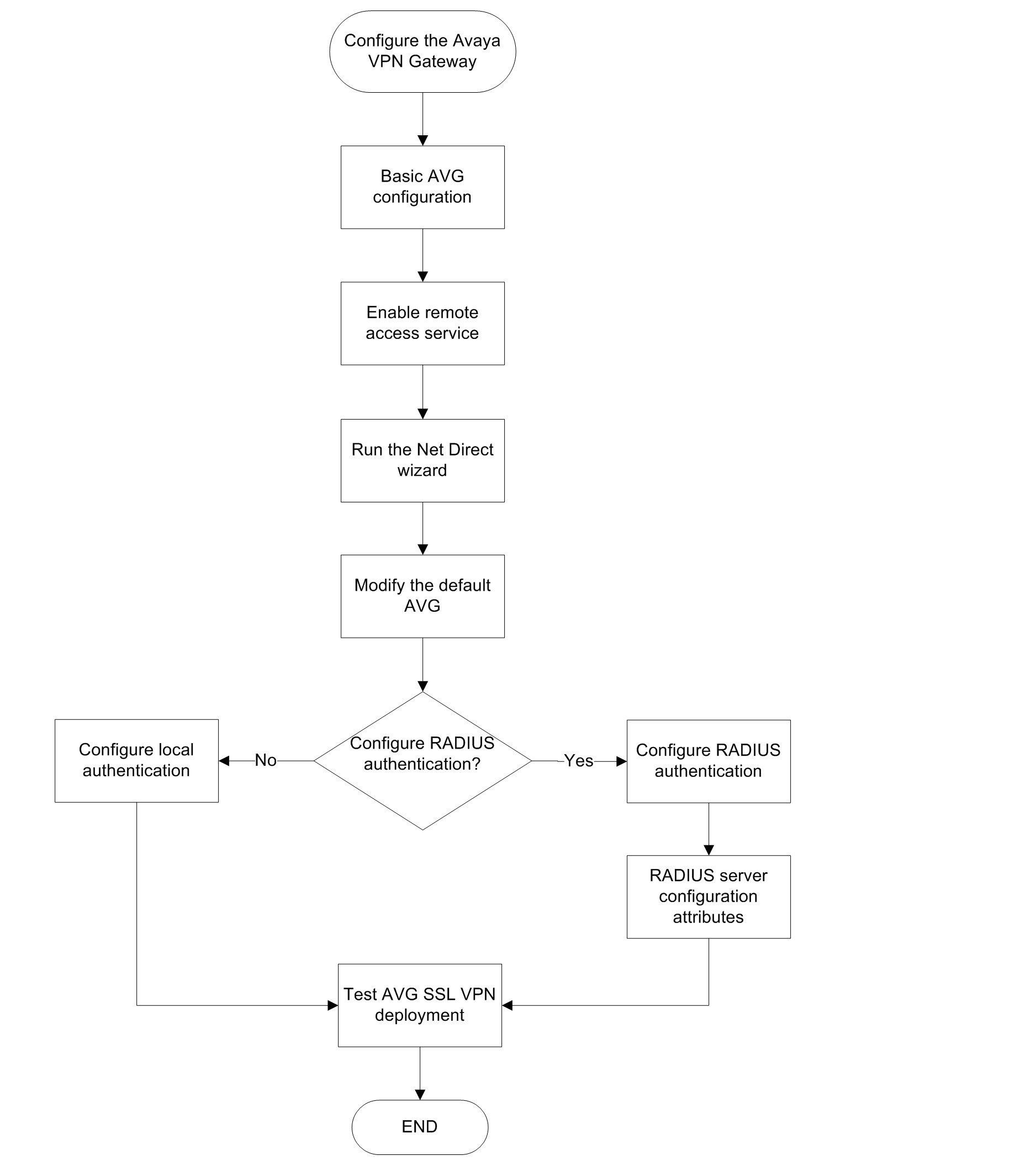
This task flow shows you the sequence of procedures you perform to configure the AVG.
Navigation

  • Basic AVG configuration
  • Enabling remote access services
  • Running the Net Direct Wizard
  • Modifying the default AVG for SSL VPN
  • Appendix B Modifying the default AVG for SSL VPN (with screens)
  • Configuring RADIUS authentication
  • RADIUS server configuration attributes
Related links
Configuring the Avaya VPN Gateway
Send Feedback

Topic navigation

Previous Topic

Initial planning and setup

Next Topic

Basic AVG configuration

In this article

  • Navigation

STAY CONNECTED

Twitter Youtube Linkedin
Footer Icon
  • Sitemap
  • Terms of use
  • Privacy
  • Cookie Policy
  • Trademarks
  • Accessibility
© 2026 Avaya LLC