

AVAYA DOCUMENTATION CENTER
Find answers to your technical questions and learn how to use our products
Installing IP Office SoftConsole
Applying a command line option
You can use the following command line options:
-
-debug- Start detailed logging the operation of the console to a text file when the console is started. See Debug tool. -
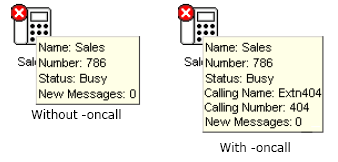
-oncall- Show the Caller ID (if available) of the other party a user is talking to when that user is busy. Support of this feature may be subject to local restrictions in some countries.
- Create a shortcut on the desktop for the application
- Right-click on the shortcut icon and select Properties.
- Select the Shortcut tab.
- Edit the target path to include the required command line option.
-
For example: "C:\Program Files (x86)\Avaya\IP Office\SoftConsole\SoftConsole.exe" -oncall
-
- Click OK.