

AVAYA DOCUMENTATION CENTER
Find answers to your technical questions and learn how to use our products
Working with Avaya Session Border Controller and Microsoft® Teams
About Avaya SBC and Microsoft Teams
General overview
Avaya SBC provides direct SIP and media connectivity between your existing enterprise voice infrastructure (for example, Avaya Aura®), the Public Switched Telephone Network (PSTN) SIP trunking services, and the Direct Routing features of Microsoft® Teams (Teams). Avaya SBC is certified to operate for incoming and outgoing calls using Teams, and provides complete coverage of customer needs with extensive scalability, interoperability, and reliability.
Calls can be made from PSTN or Avaya Aura® to Microsoft® Teams and also from Microsoft® Teams to PSTN or Avaya Aura®.
The support for Avaya SBC integration with Teams is available on Avaya SBC Release 8.1.1 and later.
Avaya SBC provides integration with the Direct Routing features of Teams so that Teams users can make voice calls, in addition to features you already use with Teams, such as video conferencing, file sharing, and chat. Phone System Direct Routing is the service inside of Teams that allows you to connect external phone lines and use Teams as an office phone system. Avaya SBC provides the Microsoft-certified SBC required to connect Teams to a private telecommunications system (PBX), such as Avaya Aura®, and to the PSTN using SIP trunking. Avaya SBC secures these connections and assures interoperability so you can select from hundreds of service providers across the globe.
Teams users can place outgoing calls to and receive incoming calls from users on an Avaya Aura® system. Incoming calls can be directed to Teams users using the Call Coverage or EC500 features of Avaya Aura®. Avaya Aura®, in turn, uses Avaya SBC and the Direct Routing features of Teams to direct calls to or from Teams users. Also, if redirection features for an Avaya Aura® user are exhausted, Avaya SBC can use LDAP routing to send the call to Teams users sequentially. For customers that have Teams users and Avaya Aura® users, the Avaya SBC can be used for both incoming and outgoing calls between Teams users and Avaya Aura® users.
For detailed information about configuring Teams when using the Direct Routing features of Avaya SBC, see the following Teams website:
https://docs.microsoft.com/en-us/microsoftteams/direct-routing-landing-page
Microsoft® Teams enhancements
Enhancements are added to Avaya SBC Release 8.1.2 to support the following features for connectivity with Microsoft® Teams:
Media Bypass for Direct Routing using IETF Interactive Connectivity Establishment (ICE)
Local Media Optimization for Direct Routing
Media Bypass
Media Bypass enables you to shorten the path of media traffic and reduce the number of hops in transit for better performance. With Media Bypass, media is kept between Avaya SBC and the client instead of sending it via the Microsoft Phone System. To configure media bypass, Avaya SBC and the client must be reachable by each other.
Interactive Connectivity Establishment (ICE)
ICE is defined in RFC 5245. Avaya SBC supports an ICE Lite
implementation, always as a peer with Microsoft® Teams. The Offer or Answer Session Description Protocol (SDP) is independent of call direction – Avaya SBC always sends an ICE Lite SDP. However, the far end Microsoft® Teams peer operates with a full ICE implementation. The far end Microsoft® Teams gathers different ICE candidates, acts as a controlling agent, and negotiates a candidate pair for the media stream.
In addition, the Far End Turn feature of the Microsoft® phone system environment is supported. Near End Turn is not supported. Avaya SBC does not gather candidates, but provides a host candidate. The host candidate is publicly reachable, but is masked with a firewall address. Avaya SBC acts as a controlled agent and does not initiate on connectivity check, but responds to a connectivity check using STUN.
Avaya SBC uses the Radvision ICE stack, which is programmed in ICE Lite mode. For Local Media Optimization, Avaya SBC reads X-MS headers in SIP. If the X-MS header is internal; the core SBC relays ICE candidates, but does not provide ICE termination or negotiation. The branch SBC acts like an ICE termination/negotiation point.
Local Media Optimization
Local Media Optimization for Direct Routing manages voice quality by:
Controlling how media traffic flows between the Microsoft® Teams clients and the Avaya SBC.
Keeping media local within the boundaries of corporate network subnets.
Allowing media streams between the Microsoft® Teams clients and Avaya SBC, even if Avaya SBC is behind corporate firewalls with private IPs and are not visible to Microsoft directly.
The following diagram illustrates the connectivity when using these new features:
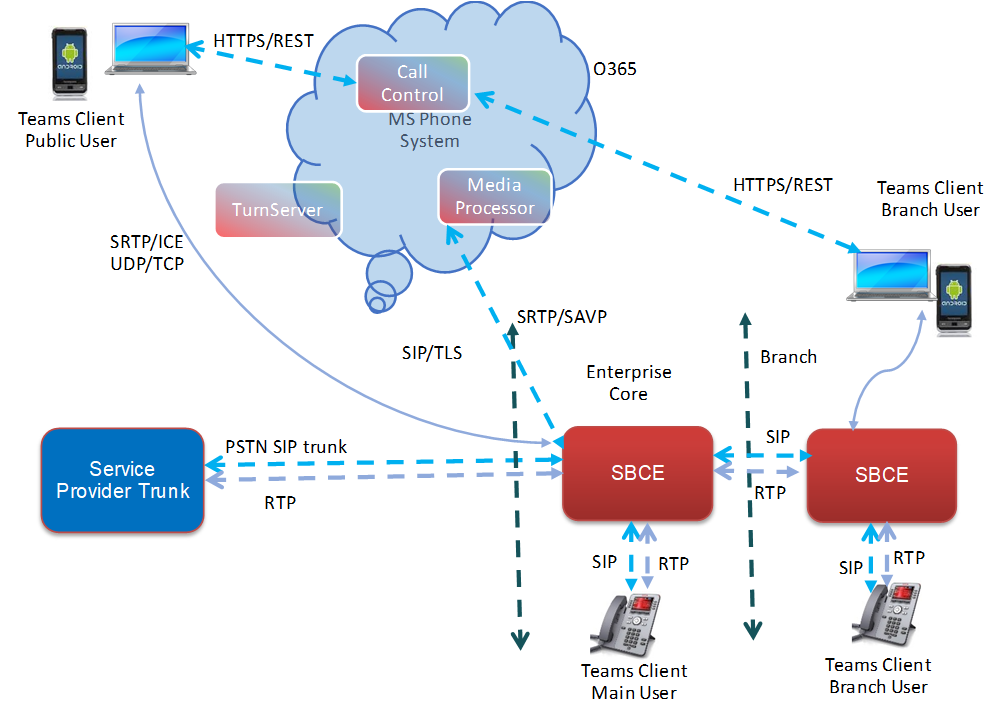
With Media Bypass for Direct Routing using ICE:
The Media Processor within the Microsoft® Phone System data center is not used.
The Microsoft® Teams Client sets up a direct media path with Avaya SBC using ICE.
ICE is terminated at the Avaya SBC, and standard SIP SDP procedures are followed for calls towards Avaya Aura® or the PSTN.
With Local Media Optimization for Direct Routing:
Local Media Optimization uses a proprietary header X-MS to understand the client location.
If the location is within an Avaya SBC branch, the core Avaya SBC passes the call through ICE.
ICE call termination and handling happens in the branch Avaya SBC.
Local Media Optimization Use Case
As an example, you have salespeople who work at the main sales office, one of your many branch offices, and visit customers who might be at any location. Avaya SBC and Teams can be administered to handle calls efficiently for the salespeople no matter where they are located, using the call processing facilities that are local to them. For example:
When sales people are in the main sales office, calls placed or received are administered to use the main, or core, Avaya SBC system configured for the main sales office.
When the salespeople are working at the branch sales office, calls placed or received are administered to use the branch Avaya SBC system configured for the branch sales office.
When the salespeople are on the road visiting customers, calls placed or received using their mobile devices are administered to use the PSTN.