

AVAYA DOCUMENTATION CENTER
Find answers to your technical questions and learn how to use our products
Using Avaya J100 Expansion Module for SIP
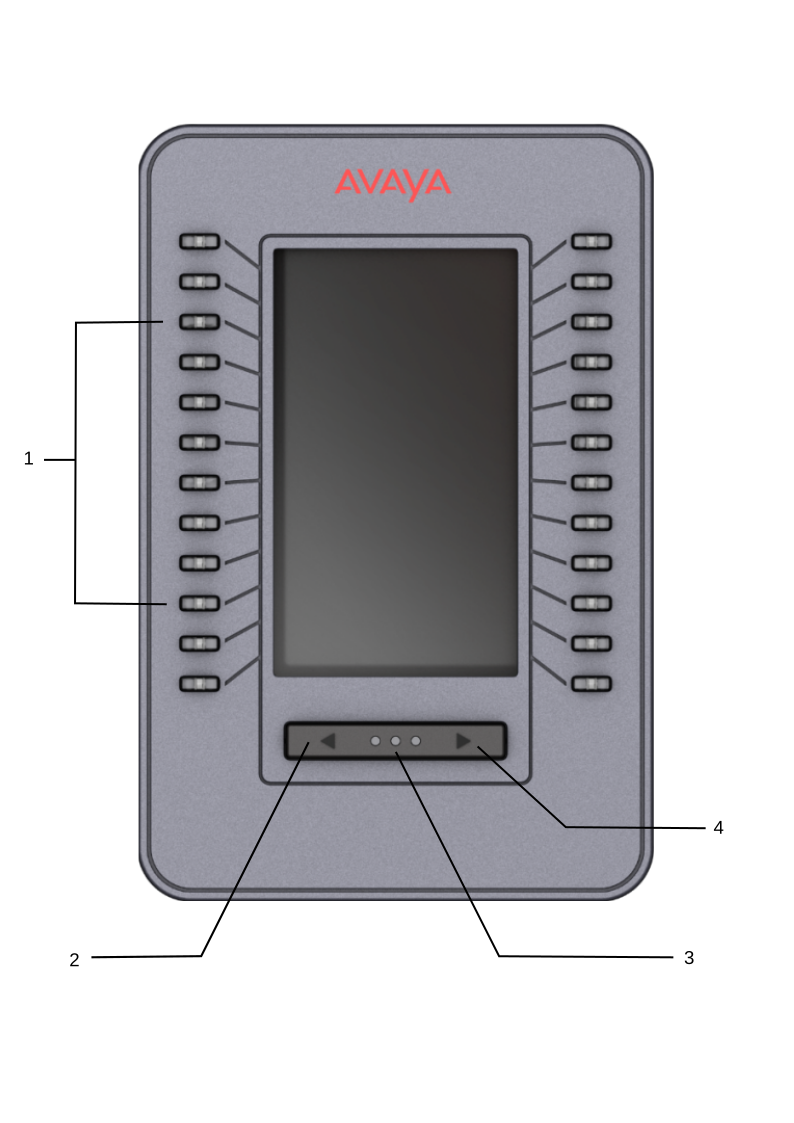
Physical layout
|
No.
|
Name
|
Description
|
|---|---|---|
|
1
|
Line buttons with integrated LEDs
|
Line buttons used for receiving calls, making outgoing calls, and answering them for other extensions or accessing features.
The LEDs integrated in the line buttons are synchronized with the LEDs on the phone. Turning off the backlight of the phone turns off the line button LEDs on the expansion module.
Line button LEDs indicate the following:
|
|
2, 4
|
Left and Right page buttons
|
Buttons used to switch to a different active page.
|
|
3
|
Active page LEDs
|
Three LEDs indicating which active page is displayed.
Note:
The indication will change if only one Avaya J100 Expansion Module if attached. If more expansion modules are attached, the first LED is lit permanently.
|