

AVAYA DOCUMENTATION CENTER
Find answers to your technical questions and learn how to use our products
Using Avaya J129 SIP IP Phone in Avaya Aura®
Physical layout of a J129 IP Phone
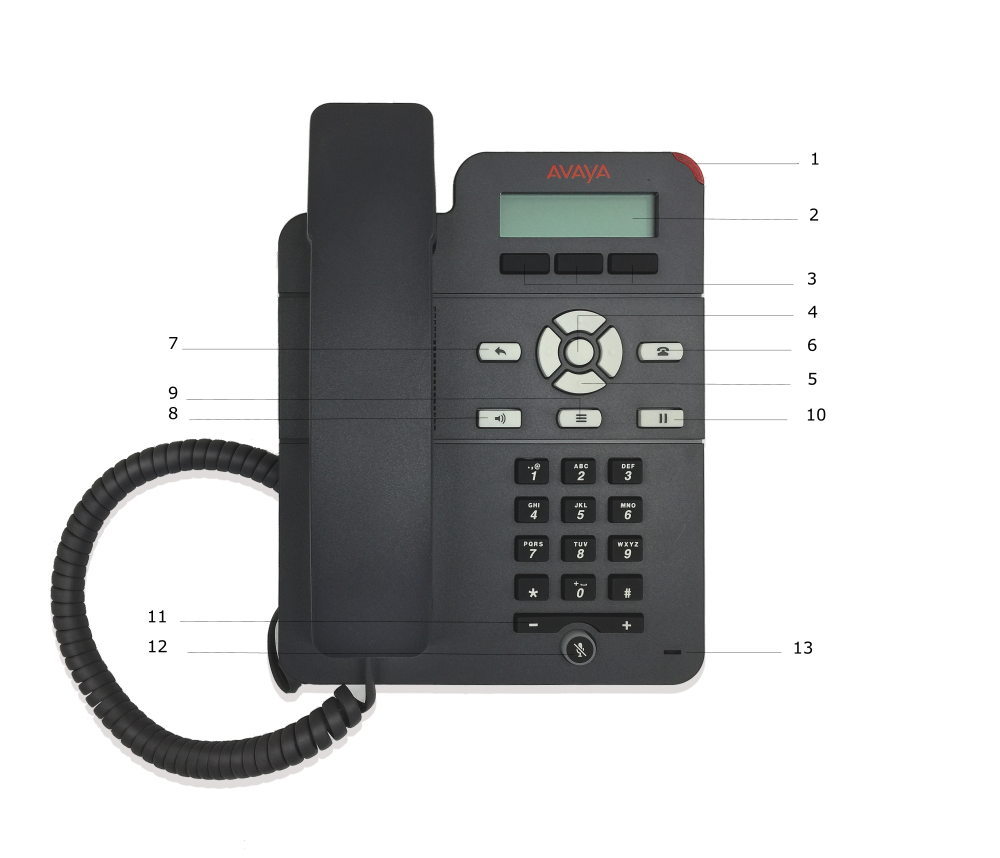
|
Callout number
|
Name
|
Description
|
|---|---|---|
|
1
|
Beacon LED
|
Displays a flashing red light to indicate a voice mail or incoming calls. The Beacon LED also flashes when you are on a call using the hands free speaker capability.
|
|
2
|
Phone display
|
Displays information such as time, softkey labels, and menu items.
If a text is wider than the display area, then the text is followed by three dots. Use the Right and Left Arrow keys to scroll through the text.
If there is a scroll bar or a line indicator at the right of the phone display, use the up and down arrow keys to scroll up and down.
|
|
3
|
Soft keys
|
Displays screen-specific commands.
|
|
4
|
OK
|
Selects the function assigned to the left soft key.
|
|
5
|
Navigation arrows
|
Navigates between various menu options.
|
|
6
|
Phone
|
Displays the Phone screen.
|
|
7
|
Back
|
Cancels the current action and returns to the previous menu.
|
|
8
|
Speaker
|
Activates and deactivates the speakerphone. You can also lift the handset to deactivate the speakerphone.
|
|
9
|
Main menu
|
Displays the menu options and other phone settings.
|
|
10
|
Hold
|
Puts the call on hold.
|
|
11
|
Volume
|
Increase or decreases the volume of the handset, or speaker when you are on a call.
Adjusts the ringer volume when you are not on a call.
|
|
12
|
Mute
|
Mutes and unmutes the microphone.
|
|
13
|
Mic
|
The mic of the phone. It is positioned on the front panel for J129D03A and later models.
|