

AVAYA DOCUMENTATION CENTER
Find answers to your technical questions and learn how to use our products
Avaya Proactive Outreach Manager High Availability
Agent Manager High Availability
The Agent Manager service runs in the any of the following modes within a single data center.
If the Agent Manager service is handling a zone, it runs in the master mode.
If the Agent Manager service is not handling a zone, it runs in the dormant mode..
An Agent Manager can manage multiple zones. You can deploy the Agent Manager in the active-active mode, where each Agent Manager manages one or more unique zones. In a single zone, you can deploy Agent Manager in the active-passive mode, where one Agent Manager manages the zone and the other Agent Manager remains in the dormant mode.
Agent Manager failover
When an Agent Manager failure occurs, the dormant Agent Manager takes over all zones of the failed server.
The following is the sequence of events that occurs during the failure of an Agent Manager handling a default zone and zone 1:
All logged in agents in the failed server zone receive the POMNotAvailable notification.
Agent handling the existing calls continue. However, they cannot operate from the desktop.
No new dialing is possible for the contacts in the failed server zone.
All in-progress calls in the failed server zone that are answered with live voice are marked as nuisance calls.
Note:If the Agent Manager fails when the Call Queuing feature is enabled and the calls are queued for an agent to get free, no queued calls are assigned to the agent after the failover.
The run-time changes that you make to the jobs of the failed server zone from Supervisor Dashboard are not saved.
Agent movement of the failed server zone from Supervisor Dashboard does not take effect.
The dormant Agent Manager takes over the zone of the failed servers.
All logged in agents in the failover server zones receive the POMAvailable notification.
Disconnected calls during the failover time are communicated to the agent desktop, and the agents handling the calls move to the wrap-up state.
The logged in agent can start operating from the agent desktop.
Campaign starts dialing in the zones of the failover servers.
The run-time changes that you make to the jobs of the failed server zone from Supervisor Dashboard are saved.
Agent movement of the failed server zone from Supervisor Dashboard takes effect.
The failover server starts sending failover server zones events to ACR.
Based on the desktop implementation, Agent Desktop might handle the POMavailable and POMnotavailable messages differently.
After the dormant Agent Manager becomes master, it checks the agent state with the desktop. If the Agent Manager finds a state mismatch, then the call gets updated with the Desktop Error completion code. The system forcefully logs out the agents. After getting logged out, the agents need to login again.
If the Agent Manager fails to receive the Disconnect event from the platform, the agent cannot perform any operation even after the POMavailable notification. Therefore, the agent must login again. If the agent is handling a call, the call gets updated with the Desktop Error completion code.
Reconfiguration of zone
When the failed Agent Manager becomes operational again, it acts as a dormant server. The administrator can assign the zone responsibility back to the original server from the Manage Zone Configuration page.
Note:
When the administrator clicks Save for the Agent Manager zone configuration after changing the allocated server of a zone, the changes are only saved in the database while the zone ownership remains unchanged.
When the administrator clicks Save and Apply for the Agent Manager zone configuration after changing the allocated server of a zone, the system displays a warning message AM Zone reset will force log out all agents. Would you like to continue? If administrator selects Yes, then the current Agent Manager forcefully logs out all the agents and releases the zone ownership. The allocated Agent Manager server takes the ownership of the zone.
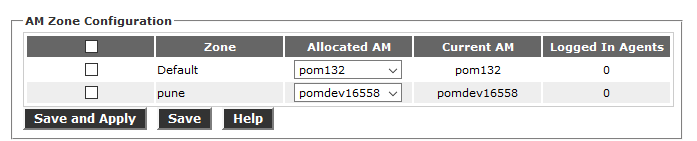
Heartbeat connection for Agent Manager
Agent Manager maintains the heartbeat connection with the dormant server to monitor its connection. When the heartbeat connection fails, all Agent Manager servers update the database with their respective status to avoid multiple masters during a network failure. If the master Agent Manager process fails, the dormant becomes the master after 40 seconds of failover time.
Note:
The server failover time is 40 seconds. This time does not include the zone initialization time. The zone initialization time depends on the number of logged in agents and the number of jobs running.
During the Agent Manager failover, the database CPU rises by 30-40% and drops to normal after completion of the Agent Manager failover.
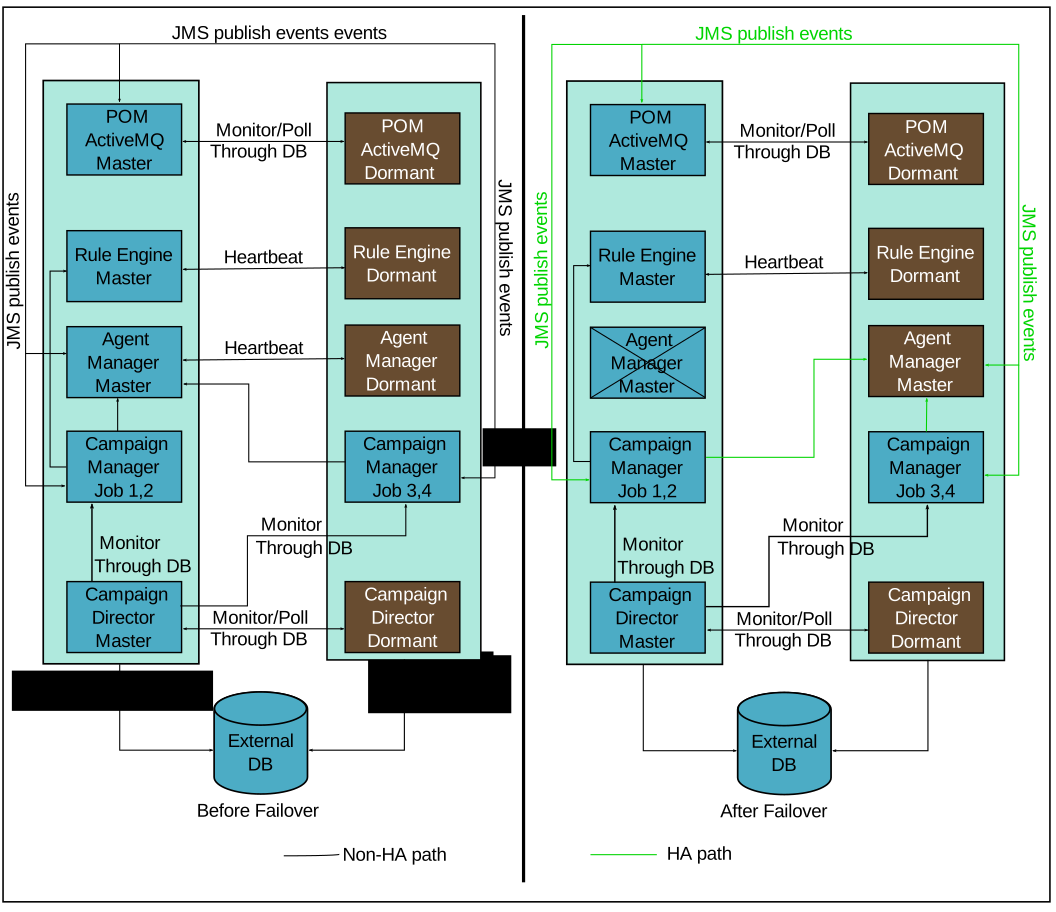
The failover duration of Agent Manager is considered as Total HA time and is included in the agent time for each agent. For more information on agent time summary report, see Using Avaya Proactive Outreach Manager Reports. You can configure the Agent Desktop heartbeat ports from the Global Configuration page. For more information, see Administering .
Desktop configuration for Agent Manager High Availability
For Agent Manager High Availability:
The desktop must have a provision for multiple Agent Manager IP addresses.
The desktop must be able to access the auxiliary agent script URL when the primary agent script URL is not accessible.
Note:POM sends the primary and auxiliary agent script URLs to the desktop.
Application server load balancing behavior
If the application server is configured in load balancing, the nailing session of the agent is distributed across two application servers. When the dormant Agent Manager becomes master after the failover, the new master Agent Manager waits for the AppServerWaitTimeOut period in which the connection is established between the Agent Manager and both application servers. This AppServerWaitTimeOut period is configurable in the POM database using pim_config table and the default time is 30 seconds.
If both application servers get connected within the AppServerWaitTimeOut period, the Agent Manager loads the nailing sessions of all agents and all agents work normally. If the Agent Manager is unable to load information for the nailing session from any of the application servers within AppServerWaitTimeOut period, such agents get Unnailed and jobdetached. Agent Manager assigns these agents again as per the requirement of the jobs.