

AVAYA DOCUMENTATION CENTER
Find answers to your technical questions and learn how to use our products
Deploying Avaya Session Border Controller on a Hardware Platform
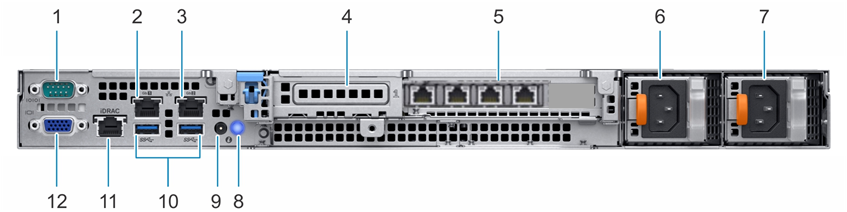
Dell R340 Avaya Solutions Platform 110 Appliance back view
Callout |
Description |
|---|---|
1 |
Serial console connection is not supported on Dell R340 server. Use the VGA console connection for new installations. |
2 |
The Ethernet connectors enable you to connect integrated 10/100/1000 Mbps NIC interfaces. This interface is for the M2 management port. |
3 |
The Ethernet connectors enable you to connect integrated 10/100/1000 Mbps NIC interfaces. This interface is for the M1 management port. |
4 |
This PCIe expansion card slot is not used. |
5 |
This PCIe expansion card slot is used for a 4-port 10/100/1000 Mbps NIC card. This card provides the four network interfaces A1, A2, B1, and B2. |
6 |
The power supply unit enables you to connect up to two 350W redundant AC power supply units. |
7 |
The power supply unit enables you to connect up to two 350W redundant AC power supply units. |
8 |
The system identification button on the front and back panels enables you to locate a system within a rack. When the system identification button is pressed, the LCD panel on the front and the system status indicator on the back blink until one of the buttons is pressed again. Press to toggle the system ID on and off. If the system stops responding during POST, press and hold the button for more than five seconds to enter the BIOS progress mode. To disable iDRAC, if not disabled in F2 iDRAC setup, press and hold the button for more than 15 seconds. |
9 |
The system identification connector connects the optional system status indicator assembly through the optional cable management arm. |
10 |
The USB 3.0 connectors enable you to connect USB devices to the system. |
11 |
The iDRAC port enables you to install a dedicated management port card. |
12 |
The video connector enables you to connect a VGA display to the system. |