

CENTRO DE DOCUMENTACIÓN DE AVAYA
Encuentre respuestas a sus preguntas técnicas y aprenda a utilizar nuestros productos
Using Avaya J129 SIP IP Phone in Avaya Cloud Office™
Connection jacks for Avaya J129 IP Phone
The following image illustrates the connection jacks that are present on the back panel of Avaya J129 IP Phone. The image schematically describes which device to connect in which jack.
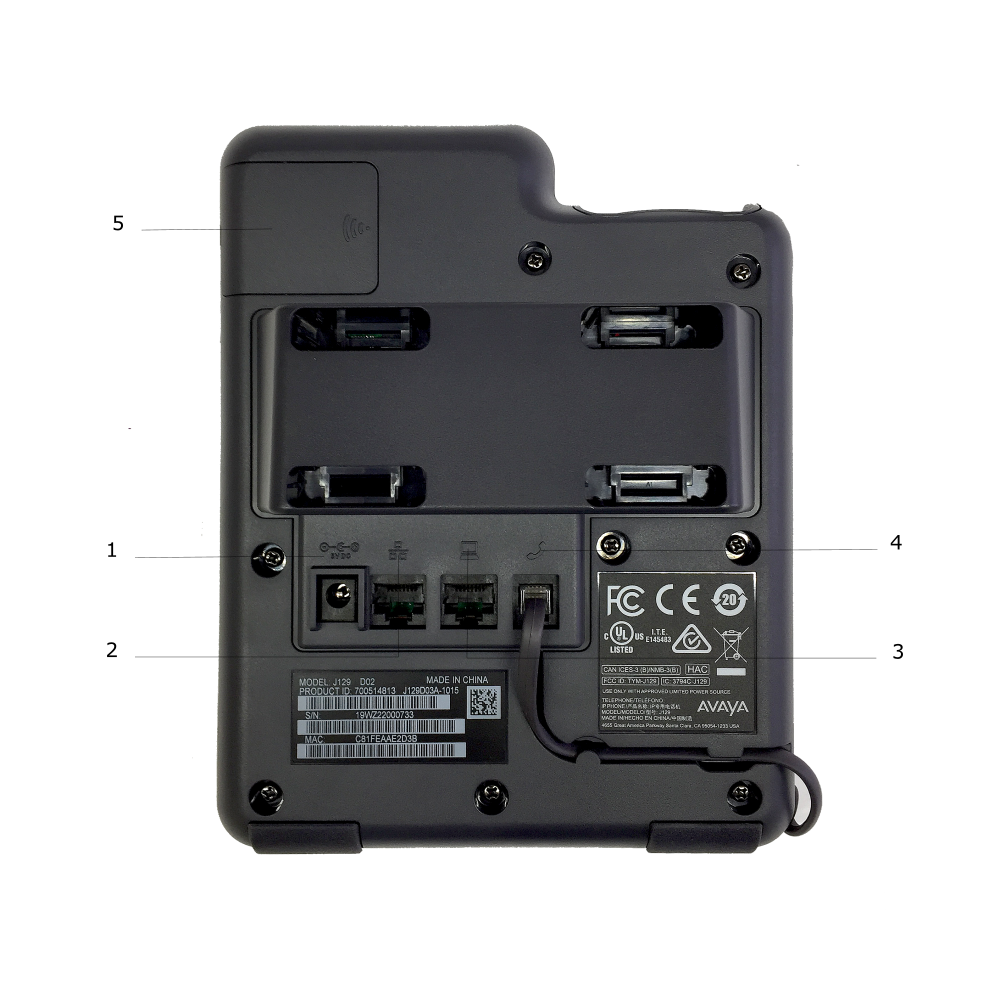
No. |
Name |
Description |
|---|---|---|
1 |
5V DC Jack |
To connect the power supply.
Note:
Available only in J129D03A and later models. |
2 |
Network port |
To connect the Ethernet cable |
3 |
PC port |
To connect the computer.
Note:
PC port is disabled when Wi-Fi network is used. |
4 |
Handset Jack |
To connect the handset. |
5 |
WLAN Module Panel |
To integrate the Wi-Fi module. |
Note:
Headset is not supported in Avaya J129 IP Phones.