AVAYA DOCUMENTATION CENTER
Find answers to your technical questions and learn how to use our products
Installing IP Office SoftConsole
Applying a command line option
You can use the following command line options:
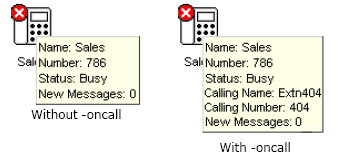
-debug- Start detailed logging the operation of the console to a text file when the console is started. See Debug tool.-oncall- Show the Caller ID (if available) of the other party a user is talking to when that user is busy. Support of this feature may be subject to local restrictions in some countries.