

AVAYA DOCUMENTATION CENTER
Find answers to your technical questions and learn how to use our products
Avaya Workspaces for Call Center Elite Solution Description
Hardware requirements
The following table provides information about the memory, disk, and vCPU requirements for the components required to support Avaya Workspaces for Call Center Elite:
Component |
Platform |
Requirement |
Avaya Workspaces for Call Center Elite |
||
|---|---|---|---|---|---|
7500 agent maximum |
5000 agent maximum |
1000 agent maximum |
|||
Avaya Workspaces for Call Center Elite Cluster 1 |
Avaya Breeze® platform |
Number of nodes |
3 |
3 |
3 |
Memory/node |
32 GB |
32 GB |
24 GB |
||
Minimum disk size/node |
500 GB |
500 GB |
500 GB |
||
vCPU’s/node |
8 |
8 |
6 |
||
Avaya Workspaces for Call Center Elite Cluster 2 |
Avaya Breeze® platform |
Number of nodes |
2 |
2 |
n/a |
Memory/node |
32 GB |
32 GB |
n/a |
||
Minimum disk size/node |
500 GB |
500 GB |
n/a |
||
vCPU’s/node |
16 |
12 |
n/a |
||
Note:
For more details on Avaya Control Manager capacity, refer to Avaya Control Manager Overview and Specification document.
Each Avaya Breeze® platform node of a cluster must reside on a different virtual server.
Avaya Workspaces for Call Center Elite supports VMware ESXi 6.7 and 7.0.
Avaya recommends using 15000 RPM disks. Avaya Workspaces for Call Center Elite supports Solid State Drives (SSD).
Important:
Based on the redundancy requirements, you can host each node on a separate ESX server, for a total of 5 ESX servers for maximum resiliency. You can also group more than one node on a single ESX server. One configuration that creates a balance between resiliency and footprint is a 3-node ESX server setup as shown in the following diagram:
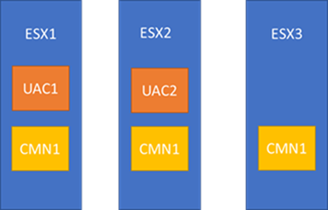
Here, the overall Avaya Workspaces setup survives the failure of at most 1 ESX node. You can determine the best option depending on your requirements.