

AVAYA DOCUMENTATION CENTER
Find answers to your technical questions and learn how to use our products
Configuring Avaya Workspaces for Avaya Experience Platform® On-Prem with Avaya WebRTC Connect
Configuring VDNs and vectors for Avaya Workspaces for Avaya Experience Platform® On-Prem
Use this procedure to configure basic VDNs and vectors which you can use to route calls to Avaya Workspaces for Avaya Experience Platform® On-Prem agents.
- Using an SSH client, connect to the Communication Manager System Access Terminal (SAT) interface.
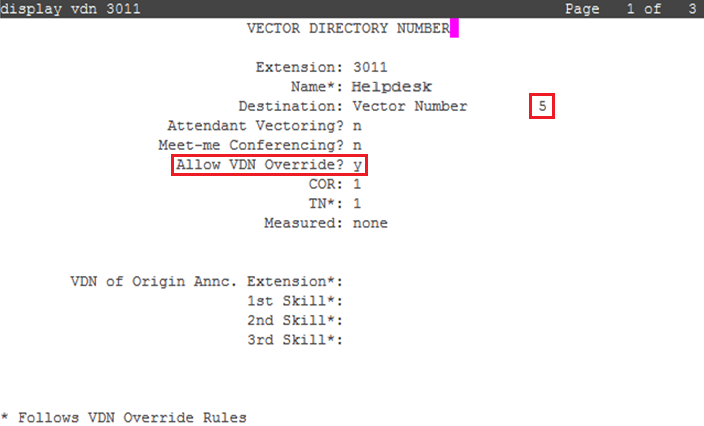
- On page 1 of the VECTOR DIRECTORY NUMBER screen, in the Name field, enter the name of the VDN.
- In the Destination field, set the destination to a vector number which is not in use.
ADDITIONAL INFORMATION:This example uses 5.
- In the Allow VDN Override field, type y.
ADDITIONAL INFORMATION:This allows this VDN to be overridden and routed to another VDN.
- Save the settings.
- Using an SSH client, connect to the Communication Manager System Access Terminal (SAT) interface.
- Run change vector n.
ADDITIONAL INFORMATION:n is the number that you entered in the Destination field of the VECTOR DIRECTORY NUMBER screen while creating the Routing VDN. In this example, the vector number is 5.
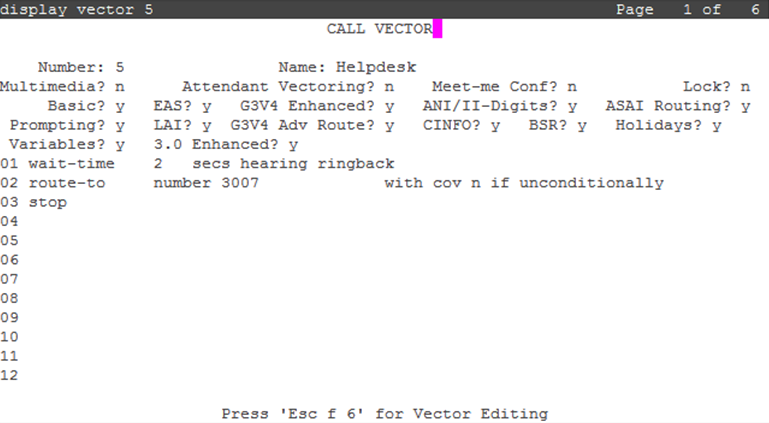
- On page 1 of the CALL VECTOR screen, in the Name field, enter the name of the vector.
- Enter the details required from line 01 to line 03 as shown below.
ADDITIONAL INFORMATION:This is an example of a basic vector which routes the call to another VDN:ADDITIONAL INFORMATION:
- Save the settings.
- Run add vdn next or add vdn n.
ADDITIONAL INFORMATION:n is the extension that you want to use for the VDN. This example uses 3007.
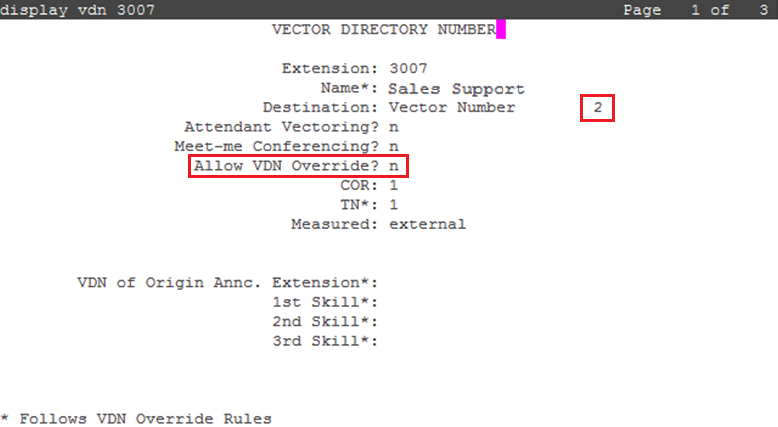
- On page 1 of the VECTOR DIRECTORY NUMBER screen, in the Name field, enter the name of the VDN.
- In the Destination field, set the destination to a vector number which is not in use.
ADDITIONAL INFORMATION:This example uses 2.
- In the Allow VDN Override field, type n.
ADDITIONAL INFORMATION:
- Save the settings.
- Using an SSH client, connect to the Communication Manager System Access Terminal (SAT) interface.
- Run change vector n.
ADDITIONAL INFORMATION:n is the number that you entered in the Destination field of the VECTOR DIRECTORY NUMBER screen while creating the Routing VDN. In this example, the vector number is 2.
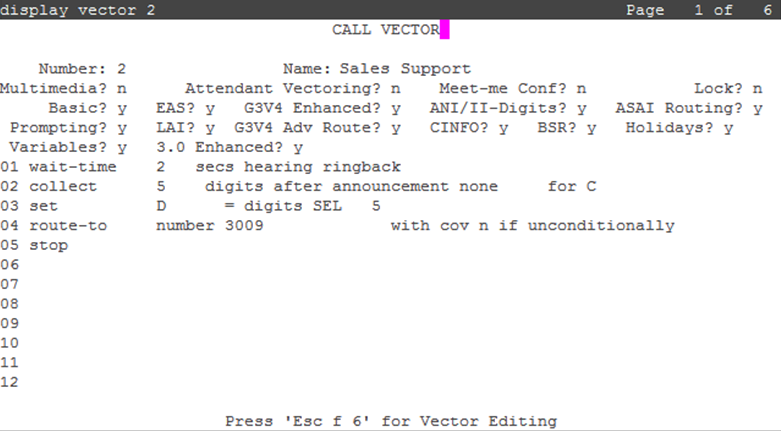
- On page 1 of the CALL VECTOR screen, in the Name field, enter the name of the vector.
- Enter the details required from line 01 to line 05 as shown below.
ADDITIONAL INFORMATION:This is an example of a basic vector which collects digits and assigns the digits to variable C. The collected digits are set to Variable D. The call then routes to Avaya Workspaces for Avaya Experience Platform® On-Prem Hunt Group:ADDITIONAL INFORMATION:
- Save the settings.