

AVAYA DOCUMENTATION CENTER
Find answers to your technical questions and learn how to use our products
Using Avaya Workspaces for Avaya Proactive Outreach Manager
Agent Workspaces page
The Agent Workspaces page has an intuitive layout that provides a visual representation of voice interactions.
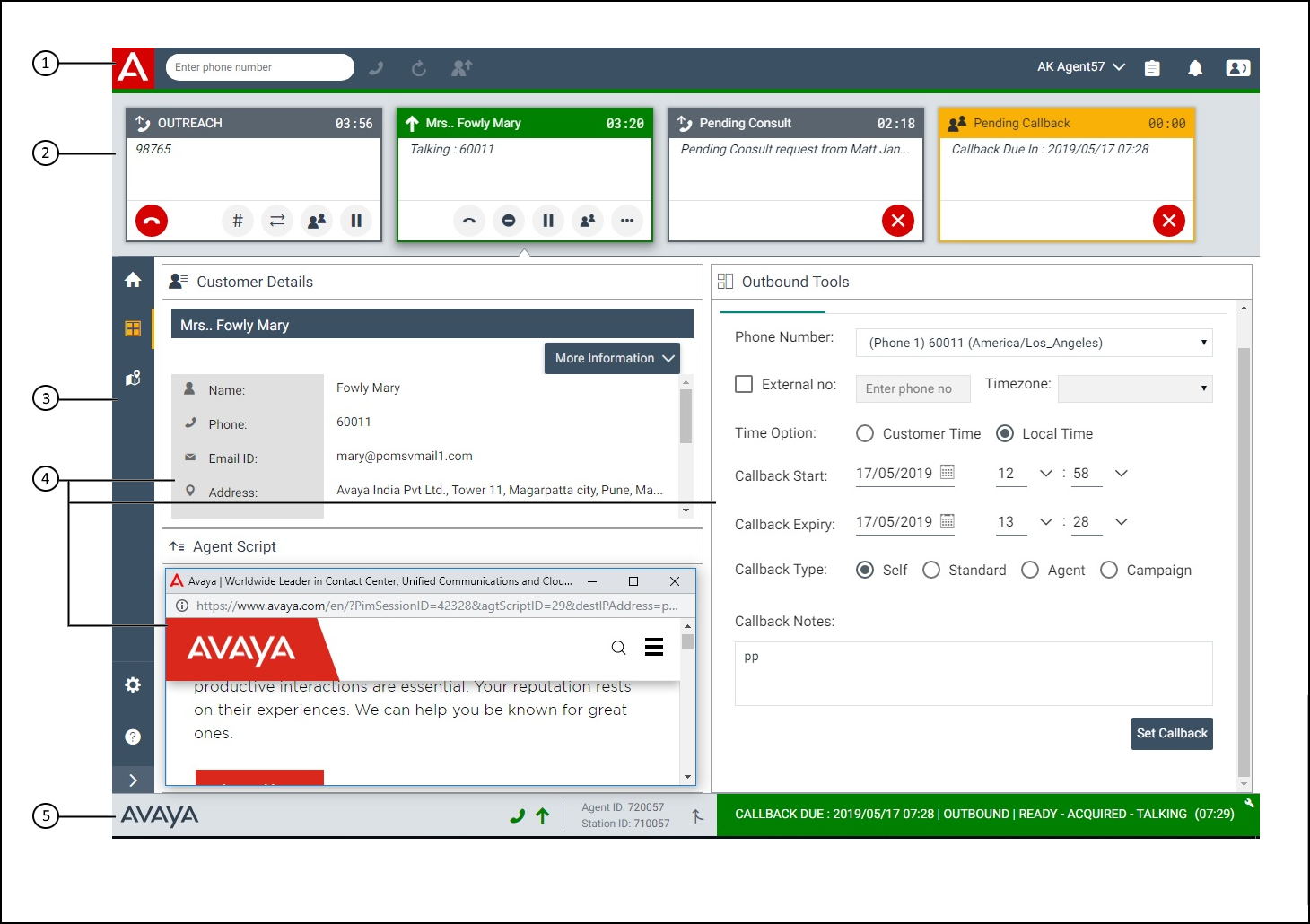
No. |
Name |
Description |
|---|---|---|
1 |
Agent toolbar |
Provides options for inbound interactions:
|
2 |
Interaction area |
Displays all contacts as interaction cards for the agent. The interaction cards are displayed for the agent. When an agent is presented with the contact information, the interaction card displays either the Pacing type and the Campaign name, or the Contact list name at the top of the card depending on the configuration by the administrator. After the call goes to talking state, the Pacing type, Campaign name, and Contact List are displayed as a Tooltip. |
3 |
Navigation menu |
Provides options to an agent to switch across the widgets. |
4 |
Interaction widgets |
Displays information related to the interaction. |
5 |
Agent state summary |
Displays your Agent ID, Station ID, Outbound state, Nail Up state, and current state with the state timer for outbound mode. |