Configuring SNMP v3 on a KVM on RHEL 8.10

Last Updated : May 28, 2025 |

About this task

The SNMP v3 feature is available on KVM on RHEL 8.10. This section provides steps for configuring the more secure SNMP version.

Note:

The SAL GW does not support Engine ID info exchange, configuring that function has been omitted from this section. For details on creating/supporting Engine ID with other NMS devices, please refer to the following Red Hat KB article:

24.6.3. Configuring Net-SNMP | Red Hat Product Documentation

Note:

Although KVM on RHEL 8.10 supports MD5 and DES for authentication protocol and privacy protocol, these are considered weak, thus vulnerable. Avaya strongly recommends using SHA-224 (or higher when possible) & AES instead.

Before you begin

Ensure that the SSH functionality is enabled on KVM on RHEL 8.10.

Procedure

  1. From a Putty session, using SSH, access the KVM on RHEL host. Authenticate using the custadm credentials.
  2. Execute the Avaya configSnmp script and follow the prompt to complete the following fields:
    • System Location (optional): For example, Thornton (could be a site location name, city name, etc.)

    • System contact and email: For example, John Kennedy jkennedy@yourdomain.com

    • System description (optional): For example, Avaya ASP 130 R6.0.x – (host FQDN)

    • Do you want to enable SNMPv1/SNMPv2c access? y/n: n

    • Do you want to enable SNMPv3 access? y/n: y

    • Do you want to add/change an SNMPv3 user y/n: y

    • Enter the SNMPv3 username, for example: Test1v3

    • Enter the index of the authentication hash type: (0=SHA, 1=SHA-224, etc…) e.g. 1

      Note:

      SHA/SHA1 is considered deprecated and, therefore, vulnerable to security scanners.

    • Enter the Authentication PassPhrase, for example: avaya123

      Note:

      This field is mandatory and requires a minimum of 8 characters.

    • Re-enter the Authentication PassPhrase, for example: avaya123

    • Enter the index of the Encryption algorithm: (0=AES, 1= AES-192, etc…) e.g. 0

    • Enter the Encryption PassPhrase, for example: avaya123

      Note:

      This field is mandatory and requires a minimum of 8 characters.

    • Re-enter the Encryption PassPhrase, for example: avaya123

    • Do you want to add/change an SNMPv3 user y/n (optional): n

      Note:

      In this example, a single SNMPv3 will be configured but multiple users can be configured at the same time.

    • Do you want to add SNMPv1 trap receivers? y/n: (n) n

    • Do you want to add SNMPv2c trap2 receivers? y/n: (n) n

    • Do you want to add SNMPv2c inform receivers? y/n: (n) n

    • Do you want to add SNMPv3 trap receivers? y/n: (n) y

      #### System will display Existing SNMPv3 users previously created e.g: Test1v3 ####

    • Enter the IP/FQDN of the host receiving the traps: e.g. 192.168.10.254

    • Enter the optional host port where to send the traps: 162 is the default value and will be used in this example.

    • Do you want to add another SNMPv3 trap receiver? y/n (optional): n

      Note:

      In this example a single trap receiver will be configured, however, multiple trap receivers can be configured at the same time.

    • Do you want to add SNMPv3 inform receivers? y/n: (n) (optional)

      Note:

      In this example inform receivers are not configured. SNMP inform traps require the SNMP manager (NMS Tool) to send an acknowledgment that it received the inform trap (get-response), therefore providing more reliability. If the manager does not acknowledge the inform trap, the agent will retry sending the inform trap a certain number of times. Both inform trap and snmp trap carry the same information.

    ASP130 output example:

    [root@asp130-r660xs-a31-8HHD ~]# configSnmp
    Note: The configured or default value is displayed in parentheses ().
    Press 'Enter' to accept it, or type a new value.
    Enter the system location: () Thornton
    Enter the system contact and email: () John Kennedy jkennedy@yourdomain.com
    Enter the system description: (Avaya ASP 130 R6) Avaya ASP 130 R6.0.x - asp130-r660xs-a31-8HHD.acp.avaya.com
    Do you want to enable SNMPv1/SNMPv2c access? y/n: (n) n
    Do you want to enable SNMPv3 access? y/n: y
    Do you want to add/change an SNMPv3 user y/n: (n) y
    Enter the SNMPv3 username: () Test1v3
     0) SHA
     1) SHA-224
     2) SHA-256
     3) SHA-384
     4) SHA-512
     5) MD5
    Enter the index of the authentication hash type: (0=SHA) 1
    Enter the Authentication PassPhrase:
    Re-Enter the Authentication PassPhrase:
     0) AES
     1) AES-192
     2) AES-256
     3) DES
    Enter the index of the Encryption algorithm: (0=AES) 0
    Enter the Encryption PassPhrase:
    Re-Enter the Encryption PassPhrase:
    Do you want to add/change an SNMPv3 user y/n: (n) n
    Do you want to add SNMPv1 trap receivers? y/n: (n) n
    Do you want to add another SNMPv2c trap2 receiver? y/n: (n) n
    Do you want to add SNMPv2c inform receivers? y/n: (n) n
    Do you want to add SNMPv3 trap receivers? y/n: (n) y
    Existing SNMPv3 users: Test1v3
    Enter the IP/FQDN of the host receiving the traps: 192.168.10.254
    Enter the optional host port where to send the traps: (162)
    Do you want to add another SNMPv3 trap receiver? y/n: (n) n
    Do you want to add SNMPv3 inform receivers? y/n: (n) n
    [root@asp130-r660xs-a31-8HHD ~]#
    
  3. Optional Verify snmpd service status:
    •  systemctl status snmpd

    ASP130 Output Example:

    [root@asp130-r660xs-a31-8HHD ~]# systemctl status snmpd
    ● snmpd.service - Simple Network Management Protocol (SNMP) Daemon.
       Loaded: loaded (/usr/lib/systemd/system/snmpd.service; enabled; vendor preset: disabled)
       Active: active (running) since Fri 2025-03-21 14:10:44 MDT; 18min ago
      Process: 142066 ExecReload=/bin/kill -HUP $MAINPID (code=exited, status=0/SUCCESS)
     Main PID: 141140 (snmpd)
        Tasks: 1 (limit: 1643572)
       Memory: 7.2M
       CGroup: /system.slice/snmpd.service
               └─141140 /usr/sbin/snmpd -LS0-6d -f
    Mar 21 14:10:44 asp130-r660xs-a31-8HHD.acp.avaya.com systemd[1]: Starting Simple Network Management Protocol (SNMP) Daemon....
    Mar 21 14:10:44 asp130-r660xs-a31-8HHD.acp.avaya.com snmpd[141140]: NET-SNMP version 5.8
    Mar 21 14:10:44 asp130-r660xs-a31-8HHD.acp.avaya.com systemd[1]: Started Simple Network Management Protocol (SNMP) Daemon..
    Mar 21 14:19:19 asp130-r660xs-a31-8HHD.acp.avaya.com systemd[1]: Reloading Simple Network Management Protocol (SNMP) Daemon..
    Mar 21 14:19:19 asp130-r660xs-a31-8HHD.acp.avaya.com snmpd[141140]: Reconfiguring daemon
    Mar 21 14:19:19 asp130-r660xs-a31-8HHD.acp.avaya.com snmpd[141140]: NET-SNMP version 5.8 restarted
    Mar 21 14:19:19 asp130-r660xs-a31-8HHD.acp.avaya.com systemd[1]: Reloaded Simple Network Management Protocol (SNMP) Daemon..
    
  4. Retrieve SNMP Engine ID:
    •	sudo cat /var/lib/net-snmp/snmpd.conf | grep EngineID

    ASP130 Output Example:

    [custadm@asp130-r660xs-a31-8HHD ~]$ sudo cat /var/lib/net-snmp/snmpd.conf | grep EngineID
    [sudo] password for custadm:
    oldEngineID 0x80001f8880c589fb4c72f08f6700000000
    
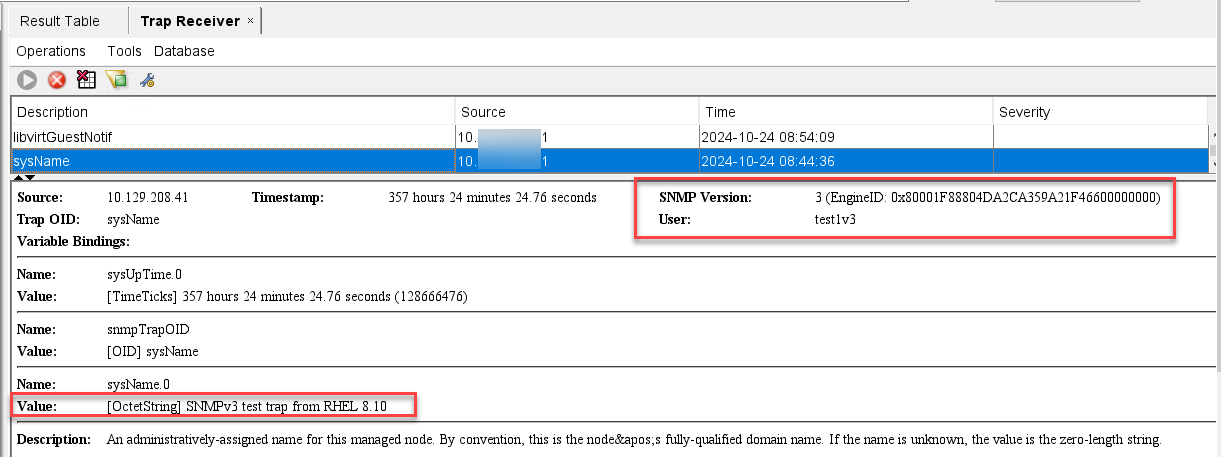
  5. Generate a SNMPv3 test trap:
    snmptrap -v3 -u <SNMPv3_user_created> -l authPriv -a SHA -A <authpassphrase> -x AES -X <privpassphrase> 192.168.10.254 '' SNMPv2-MIB::sysName sysName.0 s "SNMPv3 test trap from RHEL 8.10"

    Example:

    snmptrap -v3 -u test1v3 -l authPriv -a SHA -A avaya123 -x AES -X avaya123 10.129.209.21 '' SNMPv2-MIB::sysName sysName.0 s "SNMPv3 test trap from RHEL 8.10"
    Figure : 1. Trap View from NMS Tool – Use for Example Only