AVAYA DOCUMENTATION CENTER
Find answers to your technical questions and learn how to use our products
Deploying Avaya Workspaces for Call Center Elite
Configuring auto answer
About this task
Using Communication Manager, you can configure the auto answer setting on the agent or on the station. If enabled for the agent, this overrides the station setting. You can configure the agent auto answer setting to use the auto answer value set on the agent station.
Procedure
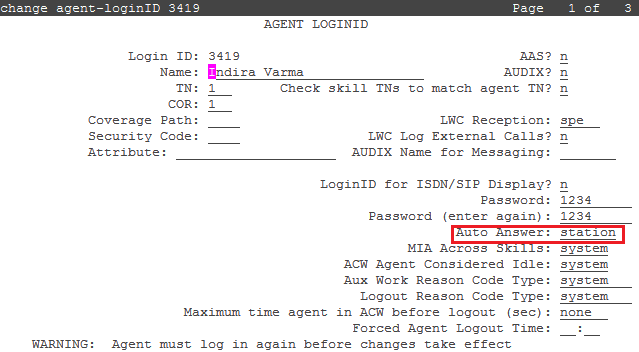
- To enable auto answer for an agent, use the change agent-loginID n command where n is the agent ID. On page 1 of the AGENT LOGINID screen, set the auto answer field to one of the following values:
all: Enter all to immediately send all ACD and non-ACD calls to the agent. The station is also given a single ring while a non-ACD call is connected. The ringer-off button can be used to prevent the ring when, on the Feature-Related System Parameters screen, the Allow Ringer-off with Auto-Answer field is set to y.
acd: Enter acd to allow only ACD split/skill calls and direct agent calls to auto answer. If this field is set to acd, non-ACD calls terminated to the agent ring audibly.
none: all calls terminated to this agent receive an audible ringing treatment. This is the default setting.
station: auto answer for the agent is controlled by the auto answer field on the station that the agent has logged in on.
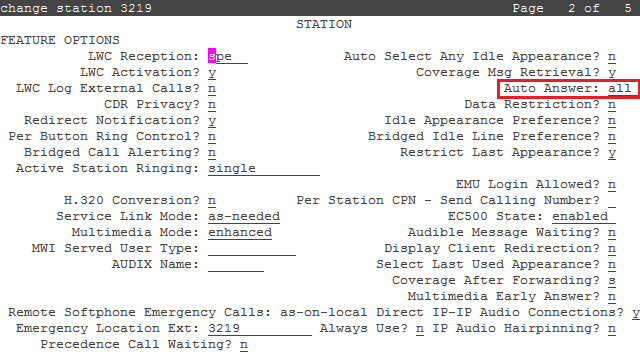
- To enable auto answer on a station, use the change station n command where n is the station number. On page 2 of the STATION screen, set the auto answer field to one of the following values:
all: Enter all to allow ACD and non-ACD calls terminated to an idle station to be cut through immediately. For non-ACD calls, the set is also rung while the call is cut through. The ring can be prevented by activating the ringer-off feature button when, on the Feature-Related System Parameters screen, the Allow Ringer-off with Auto-Answer field is set to y.
acd: Enter acd to allow only ACD split/skill calls and direct agent calls to auto answer. If this field is set to acd, non-ACD calls terminated to a station ring audibly.
none: all calls terminated to this agent receive an audible ringing treatment. This is the default setting.