AVAYA DOCUMENTATION CENTER
Find answers to your technical questions and learn how to use our products
Deploying Avaya Workspaces for Call Center Elite
Configuring auto-in and manual-in station buttons
About this task
If you enable manual-in, agents must manually change to Ready after ending a call and exiting after call work (ACW). If you enable auto-in, agents automatically go Ready after ending a call and exiting after call work (ACW).
In an Avaya Workspaces for Call Center Elite solution, the default behavior is auto-in. If you want to use the manual-in option you must add a manual-in button to agent stations. If you want to use both the auto-in and manual-in options, you must also add an auto-in button.
Important:
Before you register into Avaya Workspaces, you must register with Avaya one-X® Agent, Avaya Agent for Desktop, or Avaya Workplace Client . If you register with Avaya Workplace Client, you must configure phone service. For more information on administering Avaya Workplace Client, see Planning for and Administering Avaya Workplace Client for Android, iOS, Mac, and Windows.
You must also enable manual-in using Avaya Workspaces settings. If agents are using deskphones, they can use the deskphone to set manual-in or auto-in. However, the manual-in setting in Avaya Workspaces settings must still be selected. Avaya Workspaces for Call Center Elite does not support setting manual-in using Avaya one-X® Agent or Avaya Agent for Desktop. Agents must use Avaya Workspaces to set manual-in, and you must ensure that the manual-in option is not enabled in Avaya one-X® Agent or Avaya Agent for Desktop. For more information about Avaya Workspaces settings, see Using Avaya Workspaces for Call Center Elite.
Procedure
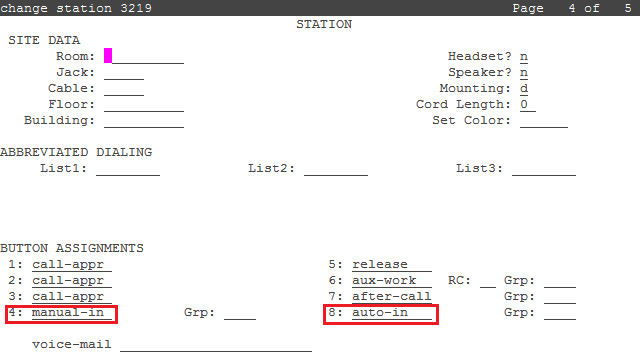
- Use the change station n command where n is the station number. On page 4 of the STATION screen, add the buttons as required for your solution.