

AVAYA DOCUMENTATION CENTER
Find answers to your technical questions and learn how to use our products
Administering Avaya Breeze® platform
Certificate management
Avaya Breeze® platform certificate deployment is managed by Avaya Aura® System Manager through the Trust Management service. The Trust Management service provides certificates to ensure secure communication between elements. Trust Management provides identity and trusted Certificate Authority (CA) certificates to establish mutually authenticated TLS sessions.
Using the Trust Management service, you can perform the following operations for an application instance:
View installed trusted and identity certificates on the Avaya Breeze® platform server.
Add or remove trusted certificates on the Avaya Breeze® platform server.
Replace or renew identity certificates on the Avaya Breeze® platform server signed by the Avaya Aura® System Manager CA.
Replace identity certificates on the Avaya Breeze® platform server signed by a third party CA.
Before attempting to make certificate changes in Avaya Breeze® platform, review your solution to understand which network elements will be affected. This will require planning and network audits before deploying new certificates. Typically, certificate changes include the following types of stages:
Assessment: Identify and scope the migration work for your network (Security level required, TLS inventory, software inventory).
Planning: Plan and schedule the migration.
Migration: The actual migration which includes possible software upgrades, trust deployment, identity certificate deployment, and cleanup.
Post-migration: Ongoing audits to avoid certificate expirations.
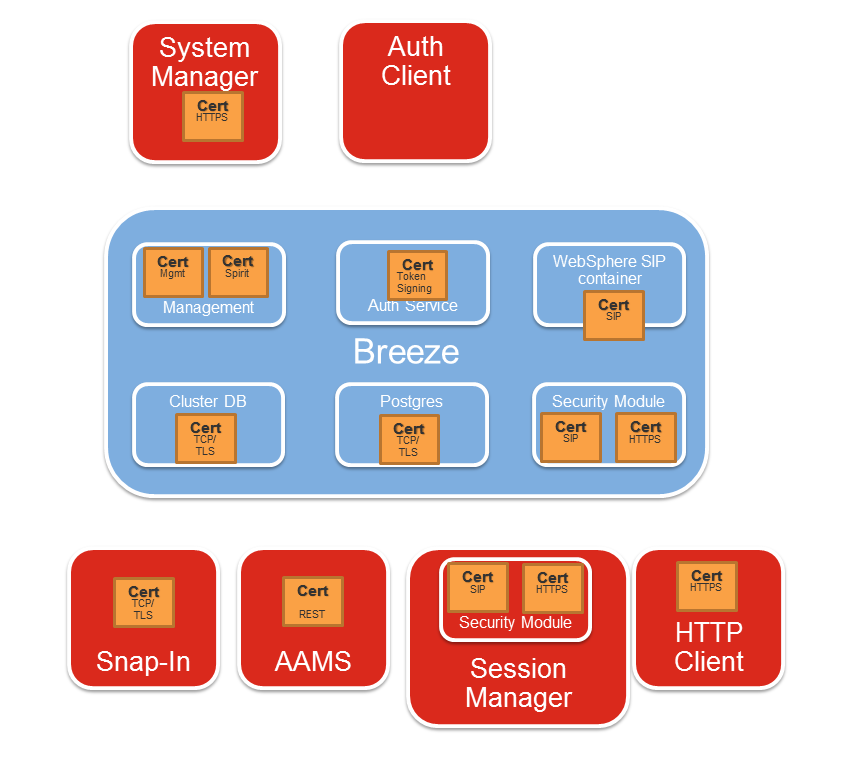
Avaya Breeze® platform uses eight identity certificates for TLS connections:
WebSphere
SPIRIT
Management
SIP
HTTPS
Cluster Database (CDB)
Authorization
Postgres
The SIP, HTTPS, CDB, and Postgres are the most important because these certificates communicate with outside entities, such as Session Manager.
Note:
Avaya Breeze® platform is initially deployed with certificates generated by the System Manager CA that lack necessary values in the SAN for the SIP and HTTPS certificates. Avaya Breeze® platform does not know its security module IP/FQDN at time of deployment. The user is required to update the SIP and HTTPS certificates from the System Manager GUI to include the security module IP/FQDN in the SAN field. Other Avaya Aura® servers now require this information when establishing trust with Avaya Breeze® platform.
Caution:
Any changes to these interfaces can cause major service interruptions.
The near-end and far-end entities can use certificates to authenticate each other, and each side presents its identity certificate during TLS negotiation. If one side does not trust the signer of the other side's identity certificate, the connection fails. For an entity to trust another certificate, the entity must possess the root CA certificate from the CA that issued the identity certificate. The root CA certificate must be stored in the entity's trusted list, which is also known as a Trust Store.
Warning:
To change the identity certificate of an Avaya Breeze® platform node, each far-end entity must first contain the new root CA certificate in its trusted list. You must add the new root CA certificate to the trusted list of the far end before changing the identity certificate.
The following diagram depicts the identity certificate on Avaya Breeze® platform, and its TLS connections to other elements in the network. Only a small subset of elements is represented.
Avaya Breeze® platform does not support elliptical curve ciphers.