AVAYA DOCUMENTATION CENTER
Find answers to your technical questions and learn how to use our products
Using Avaya Room Camera RC212 and Avaya Room Camera RC220
Connecting and powering on the camera
About this task
Perform this procedure during the initial setup of the camera or after any power-related repairs to ensure the camera functions correctly.
For optimal performance, you must check the power adapter and its function when connecting and powering on the camera.
Before you begin
Ensure that you use the power adapter that comes with the camera and that the power source is accessible.
Procedure
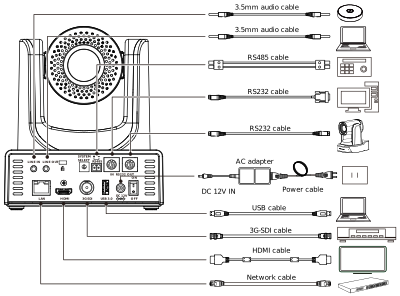
- Connect all necessary cables to the corresponding ports on the camera.
The following image shows Avaya Room Camera RC212 cable ports:
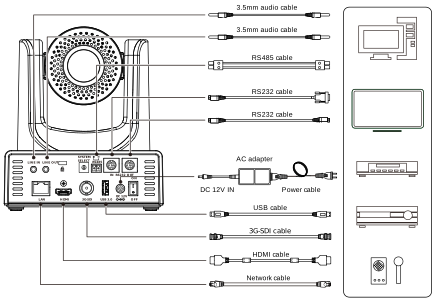
The following image shows Avaya Room Camera RC220 cable ports: