

AVAYA DOCUMENTATION CENTER
Find answers to your technical questions and learn how to use our products
Using Avaya Room Camera RC212 and Avaya Room Camera RC220
RS232 interface
The following image and table show the connectors of the RS232 cable interface and their functions:
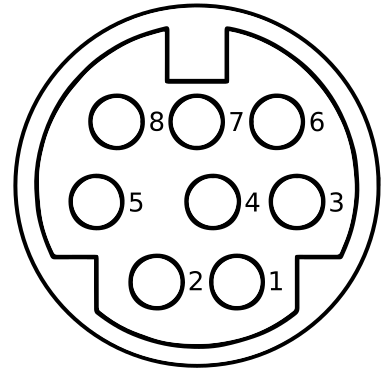
Number |
Function |
|---|---|
1. |
Data Terminal Ready (DTR), the device is ready to communicate. |
2. |
Data Set Ready (DSR), the device is ready to communicate. |
3. |
Transmit Data (TxD), transmits bytes out of the device. |
4. |
Ground (GND), ground connection. |
5. |
Receive Data (RxD), receives bytes into the device. |
6. |
Ground (GND), ground connection. |
7. |
IR OUT |
8. |
No Connection (NC) |
The following table shows the correspondence between RS232 and DB-9 connectors:
RS232 |
DB-9 |
|---|---|
1. DTR |
6. DSR |
2. DSR |
4. DTR |
3. TXD |
2. RXD |
4. GND |
5. GND |
5. RXD |
3. TXD |
6. GND |
1. CD |
7. IR OUT |
7. RTS |
8. NC |
8. CTS |
— |
9. RI |
The following table shows the correspondence between RS232 and a mini-DIN connector:
RS232 |
Mini-DIN |
|---|---|
1. DTR |
2. DSR |
2. DSR |
1. DTR |
3. TXD |
5. RXD |
4. GND |
4. GND |
5. RXD |
3. TXD |
6. GND |
6. GND |
7. IR OUT |
7. NC |
8. NC |
8. NC |