

AVAYA DOCUMENTATION CENTER
Find answers to your technical questions and learn how to use our products
Using Avaya Room Camera RC212 and Avaya Room Camera RC220
Avaya Room Camera RC212 physical layout
The following images and table give an overview of the Avaya Room Camera RC212 physical layout:
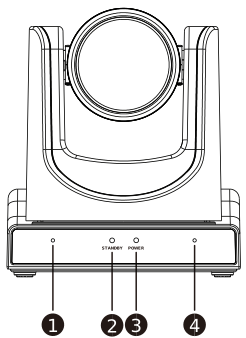
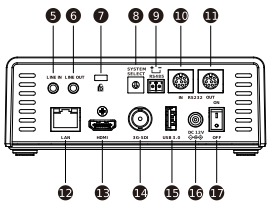
Number |
Component name |
|---|---|
1. |
Microphone |
2. |
Standby indicator |
3. |
Power indicator |
4. |
Microphone |
5. |
LINE IN port |
6. |
LINE OUT port |
7. |
Security slot |
8. |
System Select switch |
9. |
RS485 port |
10. |
RS232 IN port |
11. |
RS232 OUT port |
12. |
LAN port |
13. |
HDMI port |
14. |
3G-SDI port |
15. |
USB port |
16. |
DC 12V port |
17. |
Power switch |