

AVAYA DOCUMENTATION CENTER
Find answers to your technical questions and learn how to use our products
IP Office J100 Series Phone User Guide
J129 Telephone
The J129 is the basic desk phone in the J100 series. The operation of the J129 telephone is not covered in this manual. Instead, refer to the Using Avaya J129 IP Phone user guide.
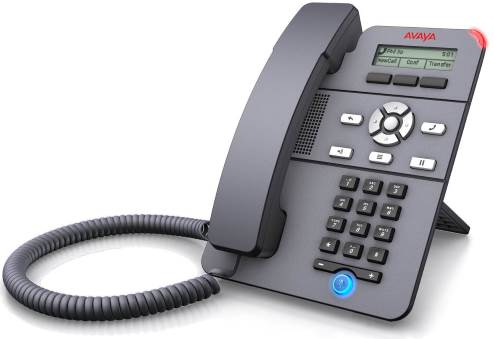
2.3" Grayscale display (128 x 32).
No programmable buttons.
3 buttons under the display used for context sensitive soft key functions as indicated by the display labels above them.
Call alerting, message waiting indication lamp.
Dual 10/100 Mbps Ethernet ports. One for phone network connection. One for PC pass-through to allow co-location with a user PC.
The phone includes a two-position desk stand. An optional wall mounting stand is available.
The J129 has a slot for an optional J100 wireless module. The module allows the phone to connect to the network using Wi-Fi.
Limitations
The phone only displays the user's personal directory. It does not list system directory contacts.
Various menu functions are not supported, though they can be accessed through other methods such as short code dialing. These are Auto Callback, Call Fwd, Call Forward-Busy, Call Forward-No Answer, Call Park, Private Call and Speed Dial.
No support for secure call indication or presence indication.
No support for emergency dialing when the phone is not registered with the system.